Say what you do and do what you say

0%

About ddr in 8641 soc

some variants of 8641 soc

  • 8641 one e600 core

  • 8641d two e600 core

  • two seperate ddr sdram controller

The signals of DDR SDRAM controller

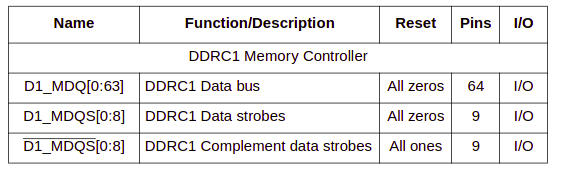
ddr_signals_1

DQ为ddr数据信号,DQS为ddr数据信号的”时钟”

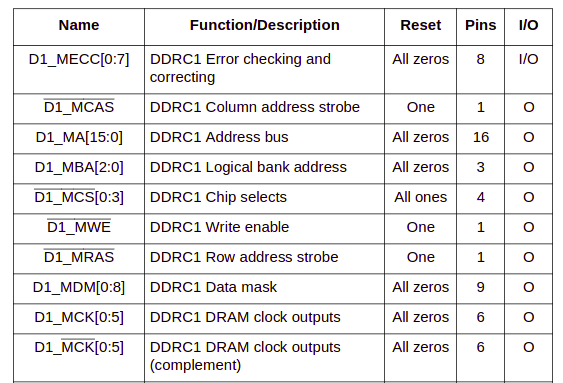
ddr_signals_2

MA为地址信号,BA为bank地址信号,CAS/RAS为地址信号的”时钟”,CS为片选,CK为差分时钟信号。该ddr控制器总共4根片选,可以接4片ddr内存。DM为数据mask信号,对于x16接口,高低字节都需要一个DM信号。
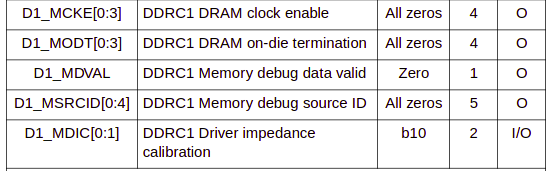
ddr_signals_3

CKE为时钟使能信号,ODT为终端电阻控制信号。

信号总共分为几类

  • data bus

  • data clock

  • address bus

  • address clock

  • control&debug

The timing settings of ddr controller

timing参数设置是由ddr控制器通过JEDEC标准定义的命令经过内存访问时序发给内存芯片的。ddr控制器和ddr芯片间通过jedec命令交互。试想一下如果没有jedec标准,每个内存芯片商按照自己的标准生产芯片,对于ddr controller厂商的实现将不会通用,必然导致增加研发成本,所以说标准化是一个很厉害的东西,尤其是各行业的标准都是技术大厂主导的。
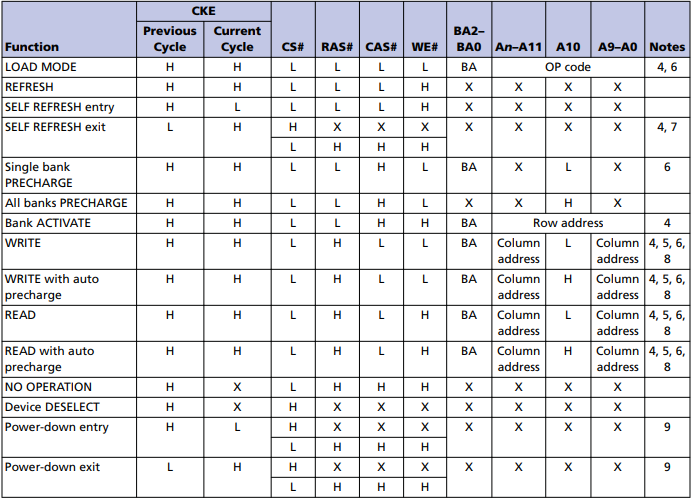
ddr2 cmd

对于BSP来讲,对ddr芯片参数的设置就转换成对ddr controller的参数进行设置。一般SOC都会以内存映射的方式映射ddr controller的控制寄存器到系统空间,这样CPU就可以配置这些参数了。

CL setting

CL for CAS Latency

CAS Latency是指内存存取数据所需的延迟时间,简单就是内存接到CPU的指令后的反应速度。

CAS Latency是指列地址选通脉冲时间延迟,控制着从收到命令到执行命令的间隔时间。
从CAS开始到CAS结束的时间就是现在讲的CAS延迟。CAS是内存寻址的最后一个步骤,在内存参数中最重要。

CL is short for CAS Latency.
CL数字越小,代表反应需要的时间越短。

initialization code of u-boot

1
drivers/ddr/fsl/mpc86xx_ddr.c

两个ddr控制器

fsl_ddr_set_memctl_regs

MT47H128M16RT-25EIT:C

根据手册ddr芯片
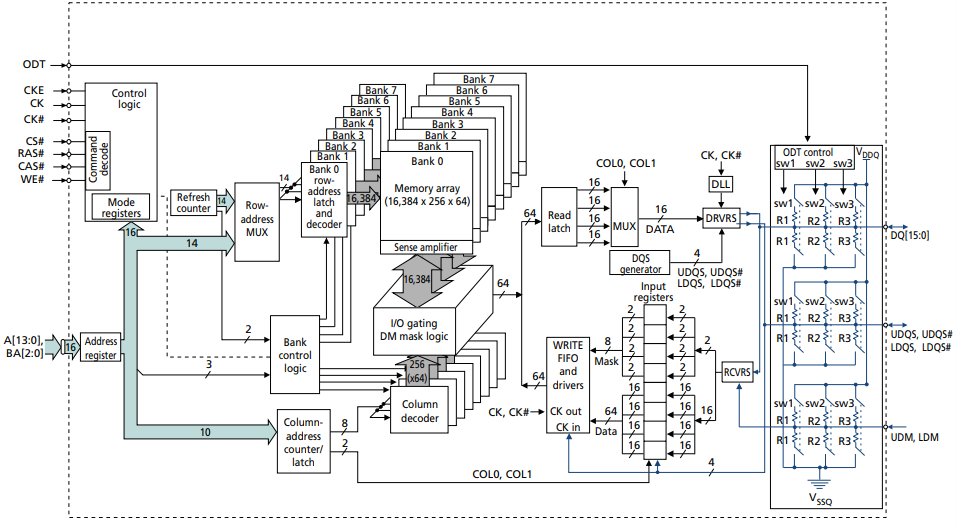
行地址14位,列地址10位,bank地址3位

总共16384256648 bits
行 列 数据 bank数
=> 32M
64 = 2G bytes

每个ddr控制器总共4个片选信号,总共可以连接4片

目前连接一片ddr,根据硬件连接确定片选信号线。

所有上面的信息需要配置给ddr芯片,配置到ddr芯片是通过ddr控制器的寄存器操作完成的。
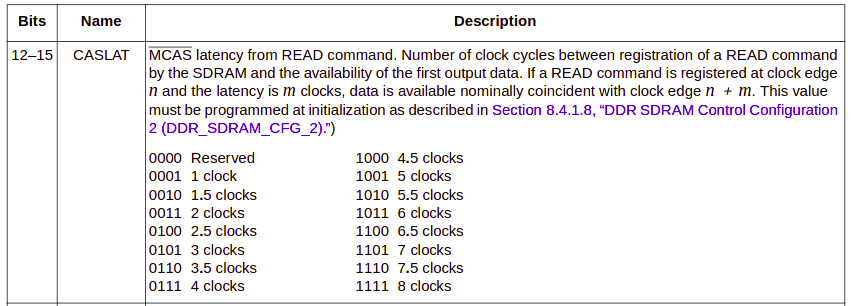
CL

相关的寄存器设置见uboot代码
sbc8641d类似配置

1
2
3
4
5
include/configs/sbc8641d
CONFIG_SYS_DDR_TIMING_3
CONFIG_SYS_DDR_TIMING_0
CONFIG_SYS_DDR_TIMING_1 0x38377322
CONFIG_SYS_DDR_TIMING_2

CONFIG_SYS_DDR_TIMING_1中12-15位配置CL参数可以按需修改。

References

1、8641d芯片手册

2、内存芯片手册

3、uboot源码

vs code作为一个编辑器,提供不错的外观和出色的性能,大量的扩展插件使其成为出色的IDE。

Installing vs code

Install c/c++ extension

Install cmake/cmake tool extensions

Using vs code

首先使用c/c++扩展写个测试代码。

1
2
3
4
5
6
7
8
9
10
11
12
13
14
15
16
17
18
19
20
21
22
23
c_cpp_properties.json
{
"configurations": [
{
"name": "Win32",
"includePath": [
"${workspaceFolder}/**",
"d:\\boost\\include\\boost-1_75"
],
"defines": [
"_DEBUG",
"UNICODE",
"_UNICODE"
],
"windowsSdkVersion": "10.0.18362.0",
"compilerPath": "C:/Program Files (x86)/Microsoft Visual Studio/2019/BuildTools/VC/Tools/MSVC/14.28.29333/bin/Hostx64/x64/cl.exe",
"cStandard": "c17",
"cppStandard": "c++17",
"intelliSenseMode": "msvc-x64"
}
],
"version": 4
}

上面把boost配置includepath,这样vs code可以智能的完成代码补全和代码提示,非常高效。

1
2
3
4
5
6
7
8
9
10
11
12
13
14
15
16
17
18
19
20
21
22
23
24
25
26
27
28
29
30
tasks.json
{
"version": "2.0.0",
"tasks": [
{
"type": "cppbuild",
"label": "C/C++: cl.exe build active file",
"command": "cl.exe",
"args": [
"/Zi",
"/EHsc",
"/ID:\\boost\\include\\boost-1_75",
"/Fe:",
"${fileDirname}\\${fileBasenameNoExtension}.exe",
"${file}"
],
"options": {
"cwd": "${workspaceFolder}"
},
"problemMatcher": [
"$msCompile"
],
"group": {
"kind": "build",
"isDefault": true
},
"detail": "compiler: cl.exe"
}
]
}

上面我们添加boost头文件,或者lib文件,可以方便的生成可执行文件。

1
2
3
4
5
6
7
8
9
10
11
12
13
14
15
16
17
18
19
20
launch.json
{
// 使用 IntelliSense 了解相关属性。
// 悬停以查看现有属性的描述。
// 欲了解更多信息,请访问: https://go.microsoft.com/fwlink/?linkid=830387
"version": "0.2.0",
"configurations": [
{
"name": "(Windows) 启动",
"type": "cppvsdbg",
"request": "launch",
"program": "${workspaceFolder}/${fileBasenameNoExtension}.exe",
"args": [],
"stopAtEntry": false,
"cwd": "${workspaceFolder}",
"environment": [],
"externalConsole": false
}
]
}

上面文件我们调试这个可执行文件的配置。

综上c/c++插件可以满足单个c++源文件的构建,在写测试代码时非常方便,但是多个文件的情况难以胜任。

Using cmake扩展

1
2
3
4
5
6
7
8
9
10
11
12
13
14
15
16
17
CMakeLists.txt

cmake_minimum_required(VERSION 3.0.0)
project(hello VERSION 0.1.0)

include(CTest)
enable_testing()

# 首先定义target
add_executable(hello foo.cpp main.cpp)

# 针对这个target设置include
target_include_directories(hello PRIVATE "d:\\boost\\include\\boost-1_75")

set(CPACK_PROJECT_NAME ${PROJECT_NAME})
set(CPACK_PROJECT_VERSION ${PROJECT_VERSION})
include(CPack)

该扩展可以帮助生成基本的cmake配置文件,在此基础上可配置多个文件的编译生成。

boost例子

1
2
3
4
5
6
7
8
9
10
11
12
13
14
15
16
17
18
19
20
21
22
23
#include <iostream>
#include <boost/array.hpp>

extern void foo();

int main() {


boost::array<int,10> a;

a[0] = 1;

int i = std::get<0,int,10>(a);

std::cout<<i<<std::endl;

std::cout<<"hello from c++!"<<std::endl;

foo();

return 0;
}

References

八皇后问题续

增加图形界面

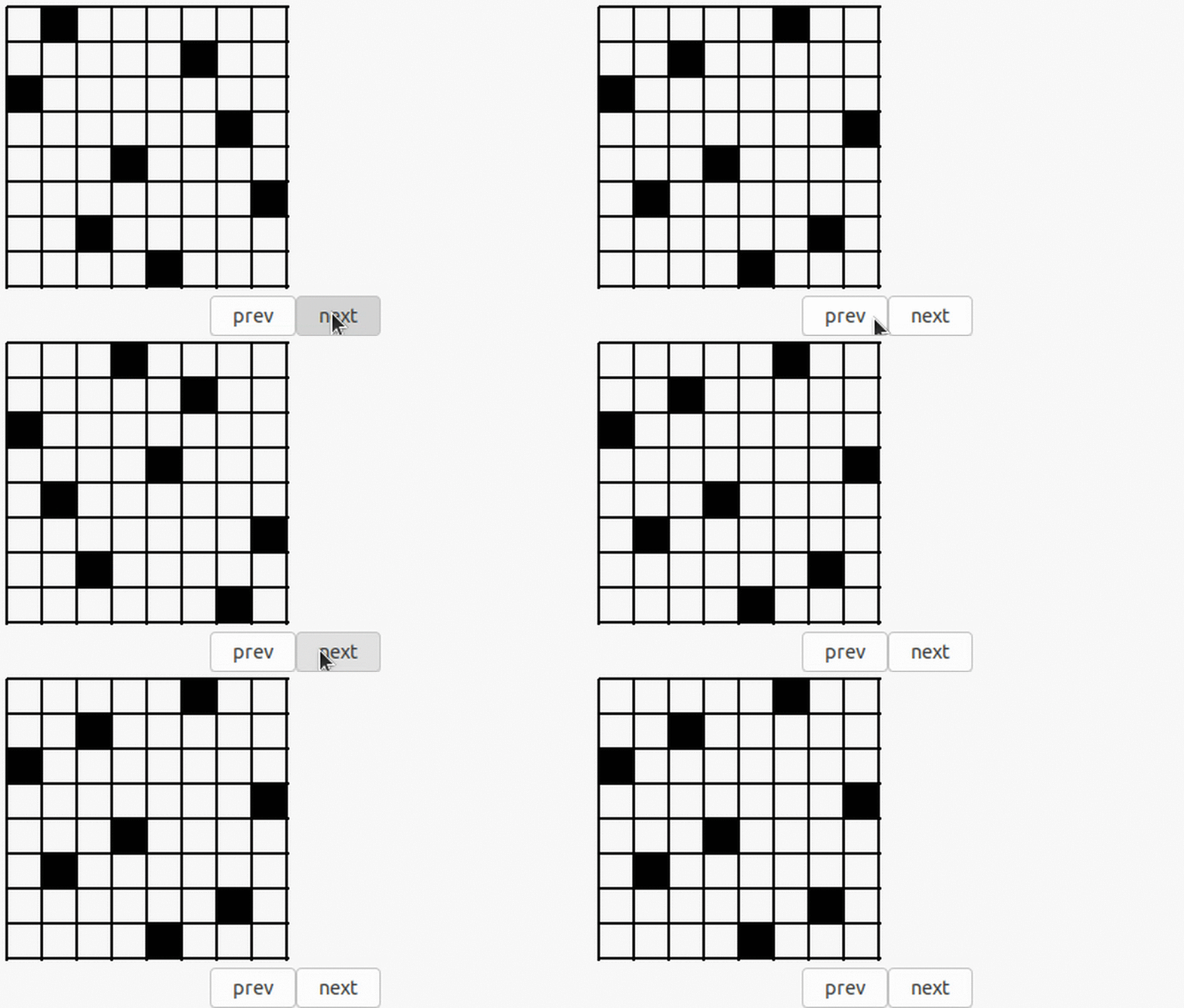
先上运行结果

例子

代码

上篇文章已经完成八皇后问题的求解,这里我们增加图形界面把结果绘制出来。

这里图形界面采用GTK实现,使用GTK+glade3完成,使用glade3设计图形界面。

代码下载

u-boot from 0 to 1

这篇文章简单分析了u-boot从汇编代码到执行加载内核的整个过程,细节参考代码。

u-boot.lds

1
2
3
4
5
6
7
8
9
10
11
12
13
14
15
su@ubuntu2004:/sdb1/u-boot-2020.10$ cat u-boot.lds
OUTPUT_FORMAT("elf32-littlearm", "elf32-littlearm", "elf32-littlearm")
OUTPUT_ARCH(arm)
ENTRY(_start)
SECTIONS
{
. = 0x00000000;
. = ALIGN(4);
.text :
{
*(.__image_copy_start)
*(.vectors)
arch/arm/cpu/armv7/start.o (.text*)
}
...

u-boot链接脚本,u-boot入口为_start。

arch/arm/lib/vectors.S

1
2
3
4
5
6
7
8
9
10
11
12
13
14
15
16
17
18
19
20
21
22
23
24
25
26
27
28
29
30
31
32
33
34
35
/*
* A macro to allow insertion of an ARM exception vector either
* for the non-boot0 case or by a boot0-header.
*/
.macro ARM_VECTORS
#ifdef CONFIG_ARCH_K3
ldr pc, _reset
#else
b reset
#endif
ldr pc, _undefined_instruction
ldr pc, _software_interrupt
ldr pc, _prefetch_abort
ldr pc, _data_abort
ldr pc, _not_used
ldr pc, _irq
ldr pc, _fiq
.endm

.globl _start

/*
*************************************************************************
*
* Vectors have their own section so linker script can map them easily
*
*************************************************************************
*/

.section ".vectors", "ax"
_start:
ARM_VECTORS
...
_reset: .word reset
...

中断向量表,如复位中断、为定义指令、数据中断、快中断、正常中断等等。

上电复位后执行复位中断。

arch/arm/cpu/armv7/start.S

1
2
3
4
5
6
7
8
9
10
11
12
13
14
15
16
17
18
19
20
21
22
23
24
25
26
27
28
29
30
31
32
33
34
35
36
37
38
39
40
41
42
43
44
45
46
47
48
49
50
51
52
53
54
55
56
57
58
59
60
61
62
63
64
65
66
67
68
69
70
71
72
73
74
75
76
77
78
79
80
81
82
83
84
85
86
87
88
89
90
91
92
93
94
95
96
97
98
99
100
101
102
103
104
105
106
107
108
109
110
111
112
113
114
115
116
117
118
119
120
121
122
123
124
/*************************************************************************
*
* Startup Code (reset vector)
*
* Do important init only if we don't start from memory!
* Setup memory and board specific bits prior to relocation.
* Relocate armboot to ram. Setup stack.
*
*************************************************************************/

.globl reset
.globl save_boot_params_ret
.type save_boot_params_ret,%function
#ifdef CONFIG_ARMV7_LPAE
.global switch_to_hypervisor_ret
#endif

reset:
/* Allow the board to save important registers */
b save_boot_params
save_boot_params_ret:
#ifdef CONFIG_ARMV7_LPAE
/*
* check for Hypervisor support
*/
mrc p15, 0, r0, c0, c1, 1 @ read ID_PFR1
and r0, r0, #CPUID_ARM_VIRT_MASK @ mask virtualization bits
cmp r0, #(1 << CPUID_ARM_VIRT_SHIFT)
beq switch_to_hypervisor
switch_to_hypervisor_ret:
#endif
/*
* disable interrupts (FIQ and IRQ), also set the cpu to SVC32 mode,
* except if in HYP mode already
*/
mrs r0, cpsr
and r1, r0, #0x1f @ mask mode bits
teq r1, #0x1a @ test for HYP mode
bicne r0, r0, #0x1f @ clear all mode bits
orrne r0, r0, #0x13 @ set SVC mode
orr r0, r0, #0xc0 @ disable FIQ and IRQ
msr cpsr,r0

/*
* Setup vector:
* (OMAP4 spl TEXT_BASE is not 32 byte aligned.
* Continue to use ROM code vector only in OMAP4 spl)
*/
#if !(defined(CONFIG_OMAP44XX) && defined(CONFIG_SPL_BUILD))
/* Set V=0 in CP15 SCTLR register - for VBAR to point to vector */
mrc p15, 0, r0, c1, c0, 0 @ Read CP15 SCTLR Register
bic r0, #CR_V @ V = 0
mcr p15, 0, r0, c1, c0, 0 @ Write CP15 SCTLR Register

#ifdef CONFIG_HAS_VBAR
/* Set vector address in CP15 VBAR register */
ldr r0, =_start
mcr p15, 0, r0, c12, c0, 0 @Set VBAR
#endif
#endif

/* the mask ROM code should have PLL and others stable */
#ifndef CONFIG_SKIP_LOWLEVEL_INIT
#ifdef CONFIG_CPU_V7A
bl cpu_init_cp15
#endif
#ifndef CONFIG_SKIP_LOWLEVEL_INIT_ONLY
bl cpu_init_crit
#endif
#endif

bl _main

/*************************************************************************
*
* cpu_init_cp15
*
* Setup CP15 registers (cache, MMU, TLBs). The I-cache is turned on unless
* CONFIG_SYS_ICACHE_OFF is defined.
*
*************************************************************************/
ENTRY(cpu_init_cp15)
/*
* Invalidate L1 I/D
*/
mov r0, #0 @ set up for MCR
mcr p15, 0, r0, c8, c7, 0 @ invalidate TLBs
mcr p15, 0, r0, c7, c5, 0 @ invalidate icache
mcr p15, 0, r0, c7, c5, 6 @ invalidate BP array
mcr p15, 0, r0, c7, c10, 4 @ DSB
mcr p15, 0, r0, c7, c5, 4 @ ISB

/*
* disable MMU stuff and caches
*/
mrc p15, 0, r0, c1, c0, 0
bic r0, r0, #0x00002000 @ clear bits 13 (--V-)
bic r0, r0, #0x00000007 @ clear bits 2:0 (-CAM)
orr r0, r0, #0x00000002 @ set bit 1 (--A-) Align
orr r0, r0, #0x00000800 @ set bit 11 (Z---) BTB
#if CONFIG_IS_ENABLED(SYS_ICACHE_OFF)
bic r0, r0, #0x00001000 @ clear bit 12 (I) I-cache
#else
orr r0, r0, #0x00001000 @ set bit 12 (I) I-cache
#endif
mcr p15, 0, r0, c1, c0, 0

#ifdef CONFIG_ARM_ERRATA_716044
mrc p15, 0, r0, c1, c0, 0 @ read system control register
orr r0, r0, #1 << 11 @ set bit #11
mcr p15, 0, r0, c1, c0, 0 @ write system control register
#endif
...
/* Early stack for ERRATA that needs into call C code */
#if defined(CONFIG_SPL_BUILD) && defined(CONFIG_SPL_STACK)
ldr r0, =(CONFIG_SPL_STACK)
#else
ldr r0, =(CONFIG_SYS_INIT_SP_ADDR)
#endif
bic r0, r0, #7 /* 8-byte alignment for ABI compliance */
mov sp, r0
...
mov pc, r5 @ back to my caller
ENDPROC(cpu_init_cp15)

从复位中断处理函数开始执行,首先关中断,禁止mmu,cache,准备c执行环境。

arch/arm/lib/crt0.S

1
2
3
4
5
6
7
8
9
10
11
12
13
14
15
16
17
18
19
20
21
22
23
24
25
26
27
28
29
30
31
32
33
34
35
36
37
38
39
40
41
42
43
44
45
46
47
48
49
50
51
52
53
54
55
56
57
58
59
60
61
62
63
64
65
66
67
68
69
70
71
72
73
74
75
76
77
78
79
80
81
82
83
84
85
86
87
88
89
90
91
92
/*
* entry point of crt0 sequence
*/

ENTRY(_main)

/*
* Set up initial C runtime environment and call board_init_f(0).
*/

#if defined(CONFIG_TPL_BUILD) && defined(CONFIG_TPL_NEEDS_SEPARATE_STACK)
ldr r0, =(CONFIG_TPL_STACK)
#elif defined(CONFIG_SPL_BUILD) && defined(CONFIG_SPL_STACK)
ldr r0, =(CONFIG_SPL_STACK)
#else
ldr r0, =(CONFIG_SYS_INIT_SP_ADDR)
#endif
bic r0, r0, #7 /* 8-byte alignment for ABI compliance */
mov sp, r0
bl board_init_f_alloc_reserve
mov sp, r0
/* set up gd here, outside any C code */
mov r9, r0
bl board_init_f_init_reserve

#if defined(CONFIG_SPL_BUILD) && defined(CONFIG_SPL_EARLY_BSS)
CLEAR_BSS
#endif

mov r0, #0
bl board_init_f
#if ! defined(CONFIG_SPL_BUILD)

/*
* Set up intermediate environment (new sp and gd) and call
* relocate_code(addr_moni). Trick here is that we'll return
* 'here' but relocated.
*/

ldr r0, [r9, #GD_START_ADDR_SP] /* sp = gd->start_addr_sp */
bic r0, r0, #7 /* 8-byte alignment for ABI compliance */
mov sp, r0
ldr r9, [r9, #GD_NEW_GD] /* r9 <- gd->new_gd */

adr lr, here
ldr r0, [r9, #GD_RELOC_OFF] /* r0 = gd->reloc_off */
add lr, lr, r0
#if defined(CONFIG_CPU_V7M)
orr lr, #1 /* As required by Thumb-only */
#endif
ldr r0, [r9, #GD_RELOCADDR] /* r0 = gd->relocaddr */
b relocate_code
here:
/*
* now relocate vectors
*/

bl relocate_vectors

/* Set up final (full) environment */

bl c_runtime_cpu_setup /* we still call old routine here */
#endif
#if !defined(CONFIG_SPL_BUILD) || CONFIG_IS_ENABLED(FRAMEWORK)

#if !defined(CONFIG_SPL_BUILD) || !defined(CONFIG_SPL_EARLY_BSS)
CLEAR_BSS
#endif

# ifdef CONFIG_SPL_BUILD
/* Use a DRAM stack for the rest of SPL, if requested */
bl spl_relocate_stack_gd
cmp r0, #0
movne sp, r0
movne r9, r0
# endif

#if ! defined(CONFIG_SPL_BUILD)
bl coloured_LED_init
bl red_led_on
#endif
/* call board_init_r(gd_t *id, ulong dest_addr) */
mov r0, r9 /* gd_t */
ldr r1, [r9, #GD_RELOCADDR] /* dest_addr */
/* call board_init_r */
#if CONFIG_IS_ENABLED(SYS_THUMB_BUILD)
ldr lr, =board_init_r /* this is auto-relocated! */
bx lr
#else
ldr pc, =board_init_r /./common/board_r.c* this is auto-relocated! */
#endif
/* we should not return here. */

主要执行board_init_f函数, 重定位u-boot。

common/board_r.c

1
2
3
4
5
6
7
8
9
10
11
12
13
14
15
16
17
18
19
20
21
22
23
24
25
26
27
28
29
30
31
32
33
34
35
36
37
38
39
40
41
42
43
44
45
46
47
48
49
50
51
52
53
54
55
/*
* We hope to remove most of the driver-related init and do it if/when
* the driver is later used.
*
* TODO: perhaps reset the watchdog in the initcall function after each call?
*/
static init_fnc_t init_sequence_r[] = {
initr_trace,
initr_reloc,
...
run_main_loop,
};
static int run_main_loop(void)
{
#ifdef CONFIG_SANDBOX
sandbox_main_loop_init();
#endif
/* main_loop() can return to retry autoboot, if so just run it again */
for (;;)
main_loop();
return 0;
}

void board_init_r(gd_t *new_gd, ulong dest_addr)
{
/*
* Set up the new global data pointer. So far only x86 does this
* here.
* TODO(sjg@chromium.org): Consider doing this for all archs, or
* dropping the new_gd parameter.
*/
#if CONFIG_IS_ENABLED(X86_64)
arch_setup_gd(new_gd);
#endif

#ifdef CONFIG_NEEDS_MANUAL_RELOC
int i;
#endif

#if !defined(CONFIG_X86) && !defined(CONFIG_ARM) && !defined(CONFIG_ARM64)
gd = new_gd;
#endif
gd->flags &= ~GD_FLG_LOG_READY;

#ifdef CONFIG_NEEDS_MANUAL_RELOC
for (i = 0; i < ARRAY_SIZE(init_sequence_r); i++)
init_sequence_r[i] += gd->reloc_off;
#endif

if (initcall_run_list(init_sequence_r))
hang();

/* NOTREACHED - run_main_loop() does not return */
hang();
}

驱动等的初始化。

common/main.c

1
2
3
4
5
6
7
8
9
10
11
12
13
14
15
16
17
18
19
20
21
22
23
24
25
26
27
/* We come here after U-Boot is initialised and ready to process commands */
void main_loop(void)
{
const char *s;

bootstage_mark_name(BOOTSTAGE_ID_MAIN_LOOP, "main_loop");

if (IS_ENABLED(CONFIG_VERSION_VARIABLE))
env_set("ver", version_string); /* set version variable */

cli_init();

if (IS_ENABLED(CONFIG_USE_PREBOOT))
run_preboot_environment_command();

if (IS_ENABLED(CONFIG_UPDATE_TFTP))
update_tftp(0UL, NULL, NULL);

s = bootdelay_process();
if (cli_process_fdt(&s))
cli_secure_boot_cmd(s);

autoboot_command(s);

cli_loop();
panic("No CLI available");
}

进入main_loop,命令行初始化,准备执行u-boot命令。

common/autoboot.c

1
2
3
4
5
6
7
8
9
10
11
12
13
14
15
16
17
18
19
20
21
22
23
24
25
26
27
28
29
30
31
32
33
34
35
36
37
38
39
40
41
42
43
44
45
46
47
48
49
50
51
52
53
54
55
56
57
58
59
60
61
62
63
const char *bootdelay_process(void)
{
char *s;
int bootdelay;

bootcount_inc();

s = env_get("bootdelay");
bootdelay = s ? (int)simple_strtol(s, NULL, 10) : CONFIG_BOOTDELAY;

if (IS_ENABLED(CONFIG_OF_CONTROL))
bootdelay = fdtdec_get_config_int(gd->fdt_blob, "bootdelay",
bootdelay);

debug("### main_loop entered: bootdelay=%d\n\n", bootdelay);

if (IS_ENABLED(CONFIG_AUTOBOOT_MENU_SHOW))
bootdelay = menu_show(bootdelay);
bootretry_init_cmd_timeout();

#ifdef CONFIG_POST
if (gd->flags & GD_FLG_POSTFAIL) {
s = env_get("failbootcmd");
} else
#endif /* CONFIG_POST */
if (bootcount_error())
s = env_get("altbootcmd");
else
s = env_get("bootcmd");

if (IS_ENABLED(CONFIG_OF_CONTROL))
process_fdt_options(gd->fdt_blob);
stored_bootdelay = bootdelay;

return s;
}

void autoboot_command(const char *s)
{
debug("### main_loop: bootcmd=\"%s\"\n", s ? s : "<UNDEFINED>");

if (stored_bootdelay != -1 && s && !abortboot(stored_bootdelay)) {
bool lock;
int prev;

lock = IS_ENABLED(CONFIG_AUTOBOOT_KEYED) &&
!IS_ENABLED(CONFIG_AUTOBOOT_KEYED_CTRLC);
if (lock)
prev = disable_ctrlc(1); /* disable Ctrl-C checking */

run_command_list(s, -1, 0);

if (lock)
disable_ctrlc(prev); /* restore Ctrl-C checking */
}

if (IS_ENABLED(CONFIG_USE_AUTOBOOT_MENUKEY) &&
menukey == AUTOBOOT_MENUKEY) {
s = env_get("menucmd");
if (s)
run_command_list(s, -1, 0);
}
}

获取bootcmd的设置,执行bootcmd的命令。

References

1、u-boot源码

八皇后问题

在棋盘上放置皇后,使得行、列、对角线只能有一个皇后。

Board类表示棋盘,Resolver类表示求解算法。

1
2
3
4
5
6
7
8
9
10
11
12
13
14
15
16
17
18
19
20
21
22
23
24
25
26
27
28
29
30
31
32
33
34
35
36
37
38
39
40
41
42
43
44
45
46
47
48
49
50
51
52
53
54
55
56
57
58
59
60
61
62
63
64
65
66
67
68
69
70
71
72
73
74
75
76
77
78
79
80
81
82
83
84
85
86
87
88
89
90
91
92
93
94
95
96
97
98
99
100
101
102
103
104
105
106
107
108
109
110
111
112
113
114
115
116
117
118
119
120
121
122
123
124
125
126
127
128
129
130
131
132
133
134
135
136
137
138
139
140
141
142
143
144
145
146
147
148
149
150
151
152
153
154
155
156
157
#include <iostream>
#include <cstring>

using namespace std;

class Board {
public:
Board(int n);

Board() : Board(DEFAULT_BOARD_SIZE) { }

int GetSize() { return m_size; }

void Set(int i, int j);

void Clear(int i, int j);

bool HasQueen(int i, int j);

bool Try(int i, int j);

bool Reinit(int n);

void Print();

~Board();

private:
bool _valid(int i,int j);
int m_size;
int* m_board;
const static int DEFAULT_BOARD_SIZE = 8;
};

/** --------------------------------- **/
Board::Board(int n){
m_size = n;
m_board = new int[n*n];
memset(m_board, 0, sizeof(int)*n*n);
}

Board::~Board(){
delete[] m_board;
}

bool Board::_valid(int i,int j) {
if (i<0 || i>=m_size)
return false;

if (j<0 || j>=m_size)
return false;

return true;
}

bool Board::Reinit(int n) {
delete[] m_board;

m_size = n;
m_board = new int[n*n];
memset(m_board, 0, sizeof(int)*n*n);

return true;
}

void Board::Print() {
int i,j;

for (i=0; i<m_size; i++)
for (j=0; j<m_size; j++) {
if (HasQueen(i,j))
cout<<"("<<i<<","<<j<<")";
}

cout<<endl;
}

void Board::Set(int i, int j) {
if (_valid(i,j))
m_board[i*m_size+j] = 1;
}

void Board::Clear(int i, int j) {
if (_valid(i,j))
m_board[i*m_size+j] = 0;
}

bool Board::HasQueen(int i, int j) {
if (_valid(i,j))
return (m_board[i*m_size+j] == 1);
else
return false;
}

bool Board::Try(int i, int j) {
int t;

if (!_valid(i,j))
return false;

// row
for (t=0; t<GetSize(); t++)
if (HasQueen(i, t)) return false;

// column
for (t=0; t<GetSize(); t++)
if (HasQueen(t, j)) return false;

// diagonal
for (t=0; t<GetSize(); t++) {
if (HasQueen(t, i+j-t)) return false;
if (HasQueen(t, t-i+j)) return false;
}

return true;
}

class Resolver {
public:
int Resolve(Board* p);
private:
void _resolve(Board* p, int row);
};

void Resolver::_resolve(Board*p, int row) {
int c;

// place the queen in row
for (c=0; c<p->GetSize(); c++) {

if (p->Try(row,c)) {
// place the queen in (row,c)
p->Set(row,c);

if (row<p->GetSize()-1) // place reset queens
_resolve(p,row+1);
else // all queens are placed
p->Print();

// search other resolves
p->Clear(row,c);
}
}
}

int Resolver::Resolve(Board* p) {
_resolve(p, 0);
return 0;
}

int main()
{
Resolver* r = new Resolver;
Board* b = new Board(8);
r->Resolve(b);
return 0;
}

vmware支持三种网络

  • vmnet0 - 桥接网络模式

    虚拟机和物理网口通过桥接方式互联

  • vmnet1 - host-only网络模式

    虚拟交换机和外部接口无任何连接

  • vmnet8 - nat网络模式

    虚拟机连接到nat网络,虚拟机发出的报文经NAT后从外部接口出去

多虚拟机方案

openwrt虚拟机两个接口一个连接nat网络作为WAN口,一个连接host-only网络作为LAN口,其它虚拟机仅连接host-only网络。可以开启openwrt的dhcp,这样虚拟机地址自动配置,无需再设置网关。所有虚拟机流量都是经过加密的。

Preparation

Installing cross compile toolchain

1
sudo apt install gcc-arm-linux-gnueabi

Files in toolchain

1
2
3
4
5
6
7
8
9
10
11
12
13
14
su@ubuntu2004:/sdb1/buildroot-2020.02.8$ dpkg -l | grep armel
ii cpp-arm-linux-gnueabi 4:9.3.0-1ubuntu2 amd64 GNU C preprocessor (cpp) for the armel architecture
ii gcc-9-arm-linux-gnueabi 9.3.0-17ubuntu1~20.04cross2 amd64 GNU C compiler (cross compiler for armel architecture)
ii gcc-arm-linux-gnueabi 4:9.3.0-1ubuntu2 amd64 GNU C compiler for the armel architecture
ii libasan5-armel-cross 9.3.0-17ubuntu1~20.04cross2 all AddressSanitizer -- a fast memory error detector
ii libatomic1-armel-cross 10.2.0-5ubuntu1~20.04cross1 all support library providing __atomic built-in functions
ii libc6-armel-cross 2.31-0ubuntu7cross1 all GNU C Library: Shared libraries (for cross-compiling)
ii libc6-dev-armel-cross 2.31-0ubuntu7cross1 all GNU C Library: Development Libraries and Header Files (for cross-compiling)
ii libgcc-9-dev-armel-cross 9.3.0-17ubuntu1~20.04cross2 all GCC support library (development files)
ii libgcc-s1-armel-cross 10.2.0-5ubuntu1~20.04cross1 all GCC support library (armel)
ii libgomp1-armel-cross 10.2.0-5ubuntu1~20.04cross1 all GCC OpenMP (GOMP) support library
ii libstdc++6-armel-cross 10.2.0-5ubuntu1~20.04cross1 all GNU Standard C++ Library v3 (armel)
ii libubsan1-armel-cross 10.2.0-5ubuntu1~20.04cross1 all UBSan -- undefined behaviour sanitizer (runtime)
ii linux-libc-dev-armel-cross 5.4.0-21.25cross1 all Linux Kernel Headers for development (for cross-compiling)
1
2
3
4
5
6
7
su@ubuntu2004:/sdb1/buildroot-2020.02.8$ dpkg -l linux-libc-dev-armel-cross
Desired=Unknown/Install/Remove/Purge/Hold
| Status=Not/Inst/Conf-files/Unpacked/halF-conf/Half-inst/trig-aWait/Trig-pend
|/ Err?=(none)/Reinst-required (Status,Err: uppercase=bad)
||/ Name Version Architecture Description
+++-==========================-=================-============-==========================================================
ii linux-libc-dev-armel-cross 5.4.0-21.25cross1 all Linux Kernel Headers for development (for cross-compiling)
1
2
3
4
5
6
7
8
9
10
11
12
13
14
15
16
17
18
19
20
21
22
23
24
25
26
27
28
29
30
31
32
33
su@ubuntu2004:/sdb1/buildroot-2020.02.8$ dpkg -L libc6-armel-cross
/.
/usr
/usr/arm-linux-gnueabi
/usr/arm-linux-gnueabi/lib
/usr/arm-linux-gnueabi/lib/ld-2.31.so
/usr/arm-linux-gnueabi/lib/libBrokenLocale-2.31.so
...
/usr/arm-linux-gnueabi/lib/libutil-2.31.so
/usr/arm-linux-gnueabihf
/usr/arm-linux-gnueabihf/lib
/usr/arm-linux-gnueabihf/libsf
/usr/share
/usr/share/doc
/usr/share/doc/libc6-armel-cross
/usr/share/doc/libc6-armel-cross/README
/usr/share/doc/libc6-armel-cross/changelog.Debian.gz
/usr/share/doc/libc6-armel-cross/changelog.gz
/usr/share/doc/libc6-armel-cross/copyright
/usr/share/lintian
/usr/share/lintian/overrides
/usr/share/lintian/overrides/libc6-armel-cross
/usr/arm-linux-gnueabi/lib/ld-linux.so.3
...
/usr/arm-linux-gnueabi/lib/libthread_db.so.1
/usr/arm-linux-gnueabi/lib/libutil.so.1
/usr/arm-linux-gnueabihf/lib/sf
/usr/arm-linux-gnueabihf/libsf/ld-2.31.so
/usr/arm-linux-gnueabihf/libsf/ld-linux.so.3
/usr/arm-linux-gnueabihf/libsf/libBrokenLocale-2.31.so
...
/usr/arm-linux-gnueabihf/libsf/libutil-2.31.so
/usr/arm-linux-gnueabihf/libsf/libutil.so.1
1
2
3
4
5
6
7
8
9
10
11
12
13
14
15
16
17
18
19
20
21
22
23
24
25
26
27
28
29
30
31
32
33
34
35
36
37
38
39
40
41
42
43
44
45
46
su@ubuntu2004:/sdb1/buildroot-2020.02.8$ dpkg -L libc6-dev-armel-cross
/.
/usr
/usr/arm-linux-gnueabi
/usr/arm-linux-gnueabi/include
/usr/arm-linux-gnueabi/include/a.out.h
...
/usr/arm-linux-gnueabi/include/wordexp.h
/usr/arm-linux-gnueabi/lib
/usr/arm-linux-gnueabi/lib/Mcrt1.o
/usr/arm-linux-gnueabi/lib/Scrt1.o
/usr/arm-linux-gnueabi/lib/crt1.o
/usr/arm-linux-gnueabi/lib/crti.o
/usr/arm-linux-gnueabi/lib/crtn.o
/usr/arm-linux-gnueabi/lib/gcrt1.o
/usr/arm-linux-gnueabi/lib/libBrokenLocale.a
...
/usr/arm-linux-gnueabi/lib/librt.a
/usr/arm-linux-gnueabi/lib/libutil.a
/usr/arm-linux-gnueabihf
/usr/arm-linux-gnueabihf/libsf
/usr/share
/usr/share/doc
/usr/share/doc/libc6-dev-armel-cross
/usr/share/doc/libc6-dev-armel-cross/README
/usr/share/doc/libc6-dev-armel-cross/changelog.Debian.gz
/usr/share/doc/libc6-dev-armel-cross/changelog.gz
/usr/share/doc/libc6-dev-armel-cross/copyright
/usr/share/lintian
/usr/share/lintian/overrides
/usr/share/lintian/overrides/libc6-dev-armel-cross
/usr/arm-linux-gnueabi/lib/libBrokenLocale.so
/usr/arm-linux-gnueabi/lib/libanl.so
...
/usr/arm-linux-gnueabi/lib/libutil.so
/usr/arm-linux-gnueabihf/libsf/Mcrt1.o
/usr/arm-linux-gnueabihf/libsf/Scrt1.o
/usr/arm-linux-gnueabihf/libsf/crt1.o
/usr/arm-linux-gnueabihf/libsf/crti.o
/usr/arm-linux-gnueabihf/libsf/crtn.o
/usr/arm-linux-gnueabihf/libsf/gcrt1.o
/usr/arm-linux-gnueabihf/libsf/libBrokenLocale.a
/usr/arm-linux-gnueabihf/libsf/libBrokenLocale.so
...
/usr/arm-linux-gnueabihf/libsf/libutil.a
/usr/arm-linux-gnueabihf/libsf/libutil.so

The GCC low-level runtime library

GCC provides a low-level library, libgcc.a or libgcc_s.so on some platforms. GCC generates calls to routines in this library automatically, whether it needs to perform some operation that is too compilcated to emit inline cde for.

Most of the routines in libgcc handle arithmetic operations that the target processor cannot perform directly. This includes integer multiply and divide on some machine, and all floating-point and fixed-point operations on other machines. libgcc also includes routines for exception handling, and a handful of miscellaneous operations.

Some of these routines can be defined in mostly machine-independent C. Others must be hand-written in assembly language for each processor that needs them.

Detail info please refer to here.

libatomic - The GNU Atomic library which is a GCC support runtime library for atomic operations not supported by hardware.

u-boot

Building u-boot

1
2
3
4
export ARCH=arm
export CROSS_COMPILE=arm-linux-gnueabi-
make vexpress_ca9x4_defconfig
make -j2

Enabling debug

include/configs/vexpress_ca9x4.h

1
2
3
4
5
6
7
#define DEBUG /*Enabling debug for u-boot*/
#ifndef __VEXPRESS_CA9X4_H
#define __VEXPRESS_CA9X4_H

#define CONFIG_VEXPRES_ORIGINAL_MEMORY_MAP
#include "vexpress_common.h"
#endif /* VEXPRESS_CA9X4_H */

DEBUG macro controls the debug information in u-boot.

Please undefine it for release version.

Enabling mtd

1
2
3
4
5
6
7
8
9
10
11
12
13
CONFIG_MTD=y

CONFIG_CMD_MTDPARTS=y

CONFIG_MTDIDS_DEFAULT="nor0=flash0-0"

CONFIG_MTDPARTS_DEFAULT="mtdparts=flash0-0:8m(kernel),56m(rootfs)"

CONFIG_MTD_NOR_FLASH=y

CONFIG_FLASH_CFI_DRIVER=y

CONFIG_FLASH_CFI_MTD=y

It’s not necessary to enable mtd partition support in u-boot.

We just pass proper arguments to kernel then kernel can startup!

1
set bootargs "console=ttyAMA0 root=/dev/mtdblock2 rootfstype=ext3"

Running u-boot

1
qemu-system-arm  -M vexpress-a9 -nographic -m 512M -kernel u-boot

Running u-boot with norflash

1
qemu-system-arm  -M vexpress-a9 -nographic -m 512M -kernel u-boot -pflash firmware.bin

Generating firmware

1
2
3
4
5
6
7
8
# create 64M image
dd if=/dev/zero of=firmware.bin bs=1M count=64
# copy kernel to firmware
dd if=uImage of=firmware.bin bs=1M seek=0 conv=notrunc
# copy dtb to firmware
dd if=vexpress-v2p-ca9.dtb of=firmware.bin bs=1M seek=7 conv=notrunc
# copy rootfs to firmware
dd if=rootfs.img of=firmware.bin bs=1M seek=8 conv=notrunc

flash image layout

TITLE range
uImage 0-7M
vexpress-v2p-ca9.dtb 7-8M
rootfs.img 8-64M

rootfs.img is a ext3 file system image.

How to build uImage,dtb,rootfs is in the next part.

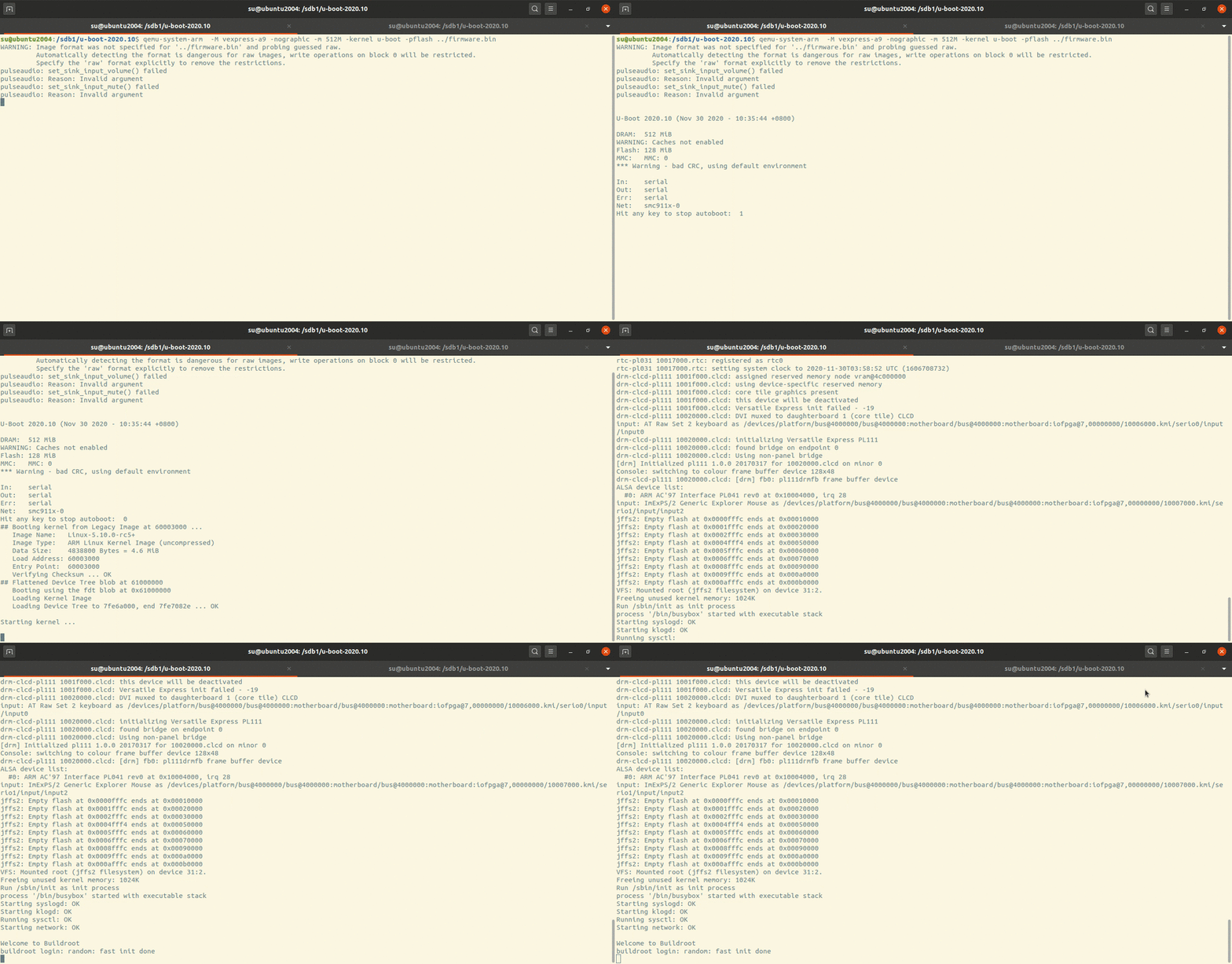
Running Example:
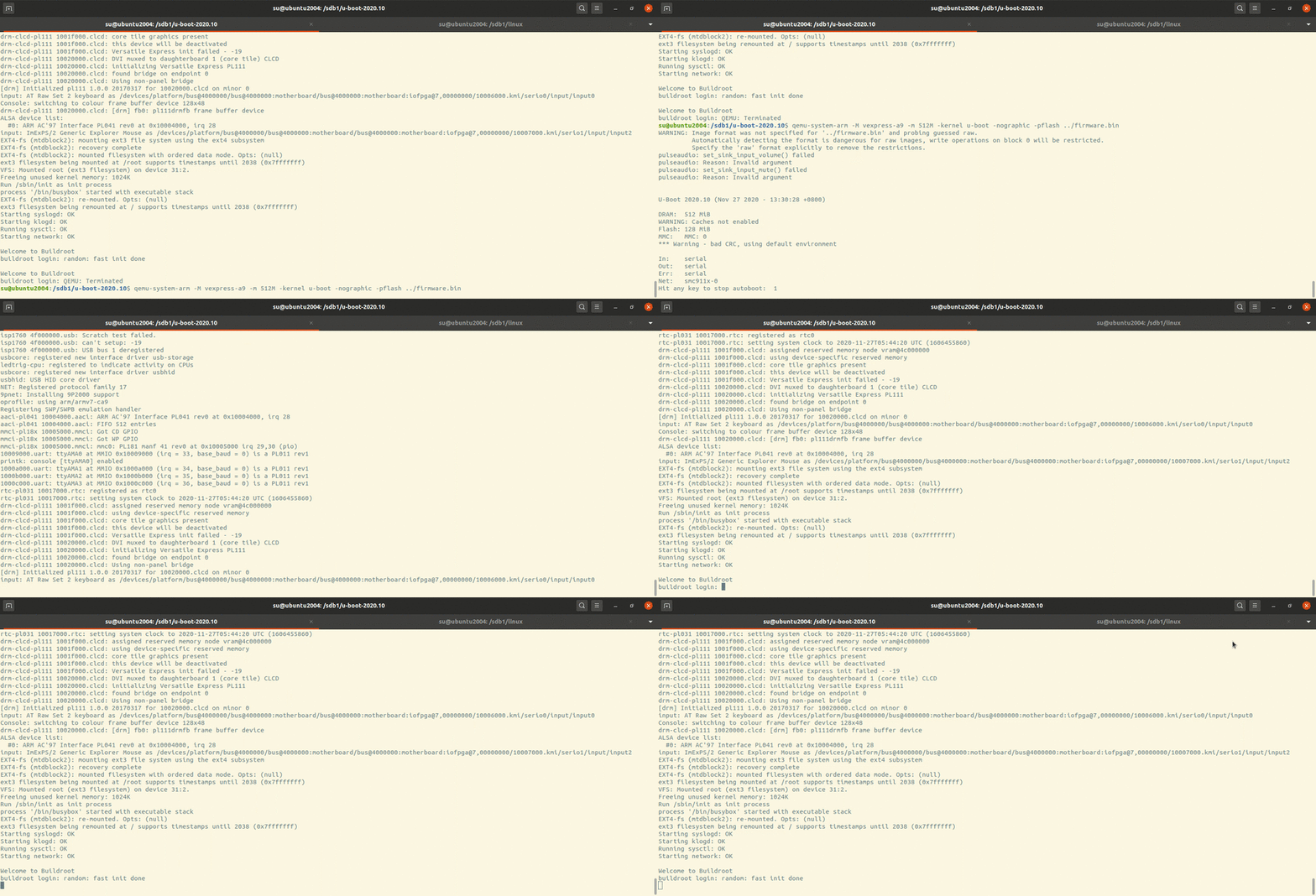
u-boot-kernel-rootfs

u-boot will load kernel from flash then start the kernel.

The kernel will mount rootfs with arguments which are passed from u-boot.

Init will be run and system will startup.

kernel

Building kernel

1
2
3
4
5
export ARCH=arm
export CROSS_COMPILE=arm-linux-gnueabi-
make O=../vexpress-a9 vexpress_defconfig # generate .config
make O=../vexpress-a9 LOADADDR=0x60003000 uImage -j2 # generate uImage
make O=../vexpress-a9 dtbs # generate dtbs

Generating partitions

As new kernels are all using dts so we need to moidy dts for partitions.

1
2
3
4
5
6
7
8
9
10
11
12
13
14
15
16
17
18
19
20
vim arch/arm/boot/dts/vexpress-v2p-ca9.dts
&flash0 {
partitions {
compatible = "fixed-partitions";
#address-cells = <1>;
#size-cells = <1>;
kernel: partition@0 {
label = "kernel";
reg = <0x00000000 0x00700000>;
};
dtb: partition@700000 {
label = "dtb";
reg = <0x00700000 0x00100000>;
};
rootfs: partition@800000 {
label = "rootfs";
reg = <0x00800000 0x03800000>;
};
};
};
1
2
3
4
5
6
7
8
9
10
11
vim arch/arm/boot/dts/vexpress-v2m.dtsi
...
flash0: flash@0,00000000 {
compatible = "arm, vexpress-flash", "cfi-flash";
reg = <0 0x00000000 0x04000000>,
<1 0x00000000 0x04000000>;
bank-width = <4>;
partitions {
compatible = "arm,arm-firmware-suite";
};
};

flash0 here is alias for flash device in dts file.

We modify it using fixed partition mode, not arm-firmware-suite mode which need each partition must contains self footer information at the end of partition.

Running kernel

1
qemu-system-arm -M vexpress-a9 -m 512M -nographic -kernel zImage -dtb vexpress-v2p-ca9.dtb

It will hung up with message:

1
end Kernel panic - not syncing: VFS: Unable to mount root fs on unknown-block(0,0)

As we havent set rootfs!

uclibc-ng

As uclibc died, we use uclibc-ng instead.

Refer to document we use command as below.

  • Installing linux kernel header

    Our environment settings:

    kernel source path /sdb1/linux
    kernel compile path /sdb1/vexpress_a9
    install header path /sdb1/linux-headers
1
2
cd /sdb1/linux
make ARCH=arm CROSS_COMPILE=arm-linux-gnueabi- O=../vexpress_a9 INSTALL_HDR_PATH=../linux-headers
  • Configuration

    1
    make menuconfig

    ​ Settings for our target system:

    TARGET_arm=y
    TARGET_ARCH=”arm”
    CONFIG_ARM_EABI=y
    KERNEL_HEADERS=”/sdb1/linux-headers/include”
  • Building uclibc-ng

    1
    make CROSS_COMPILE=arm-linux-gnueabi- O=/sdb1/out-uclibc-ng

    Note O= must be absolute path.

  • Installation

    1
    make O=/sdb1/out-uclibc-ng PREFIX=/sdb1/uclibc-ng-install install

    After the installation, everything is as below here:

    Everything under arm-linux-uclibc/lib/* we need put them in our target rootfs.

    usr/* is for building and linking our application which is used by cross-compiler.

    On ubuntu 20.04, the arm cross-toolchain using apt is gcc9.3 with glibc 2.31 and kernel header version is 5.4.21.

    So if we want to use uclibc-ng we may need compile gcc ourselves.

    1
    2
    3
    4
    5
    6
    7
    8
    9
    10
    11
    12
    13
    14
    15
    16
    17
    18
    19
    20
    21
    22
    23
    24
    25
    26
    27
    28
    29
    30
    31
    32
    33
    34
    35
    36
    37
    38
    39
    40
    ../uclibc-ng-install/
    └── usr
    └── arm-linux-uclibc
    ├── lib
    │   ├── ld-uClibc-1.0.36.so
    │   ├── ld-uClibc.so.0 -> ld-uClibc.so.1
    │   ├── ld-uClibc.so.1 -> ld-uClibc-1.0.36.so
    │   ├── libc.so.0 -> libuClibc-1.0.36.so
    │   ├── libc.so.1 -> libuClibc-1.0.36.so
    │   └── libuClibc-1.0.36.so
    └── usr
    ├── include
    │   ├── alloca.h
    │   ├── a.out.h
    ...
    │   ├── unistd.h
    │   ├── values.h
    │   ├── wait.h
    │   └── wchar.h
    └── lib
    ├── crt1.o
    ├── crti.o
    ├── crtn.o
    ├── libc.alibc-2.31.so
    ├── libc_pic.a -> libc.a
    ├── libcrypt.a
    ├── libcrypt_pic.a -> libcrypt.a
    ├── libc.so
    ├── libdl.a
    ├── libdl_pic.a -> libdl.a
    ├── libnsl.a
    ├── libnsl_pic.a -> libnsl.a
    ├── libpthread_nonshared.a
    ├── libpthread_nonshared_pic.a -> libpthread_nonshared.a
    ├── libresolv.a
    ├── libresolv_pic.a -> libresolv.a
    ├── librt.a
    ├── librt_pic.a -> librt.a
    ├── Scrt1.o
    └── uclibc_nonshared.a

    usr/include/* and usr/lib/* are for compiler to link with.

    lib/* are the runtime shared libraries for applications.

rootfs

1
2
3
4
5
6
export ARCH=arm
export CROSS_COMPILE=arm-linux-gnueabi-
make defconfig
make menuconfig # setting build option with Build static binary (no shared libs)
make -j2
make install # will create _install directory with all thins in it

Or default building mode is shared, so we need copy all shared libraries to system rootfs.

cp /usr/arm-linux-gnueabi/lib/.so. rootfs/lib -arf

If we want to use arm-linux-gnueabi toolchain, the size of libraries is aboud 16M. Maybe we should build our uclibc toolchain.

Making rootfs

ext3

1
2
3
4
5
6
7
8
9
10
11
12
13
14
15
16
17
18
19
20
21
22
23
24
25
26
27
28
29
30
31
32
33
34
#!/bin/bash

base=`pwd`
tmpfs=/_tmpfs

sudo rm -rf rootfs
sudo rm -rf ${tmpfs}
sudo rm -f a9rootfs.ext3

sudo mkdir rootfs
sudo cp _install/* rootfs/ -raf

cd rootfs && sudo mkdir -p lib proc sys tmp root var mnt && cd ${base}

# add shared runtime libraries from arm-linux-gnueabi (glibc 2.31)
sudo cp /usr/arm-linux-gnueabi/lib/*.so.* rootfs/lib -arf

sudo cp examples/bootfloppy/etc rootfs/ -arf
sudo sed -r "/askfirst/ s/.*/::respawn:-\/bin\/sh/" rootfs/etc/inittab -i
sudo mkdir -p rootfs/dev/
sudo mknod rootfs/dev/tty1 c 4 1
sudo mknod rootfs/dev/tty2 c 4 2
sudo mknod rootfs/dev/tty3 c 4 3
sudo mknod rootfs/dev/tty4 c 4 4
sudo mknod rootfs/dev/console c 5 1
sudo mknod rootfs/dev/null c 1 3
sudo dd if=/dev/zero of=a9rootfs.ext3 bs=1M count=64

sudo mkfs.ext3 a9rootfs.ext3
sudo mkdir -p ${tmpfs}
sudo chmod 777 ${tmpfs}
sudo mount -t ext3 a9rootfs.ext3 ${tmpfs}/ -o loop
sudo cp -r rootfs/* ${tmpfs}/
sudo umount ${tmpfs}

jffs2

1
2
3
4
5
6
7
8
9
10
11
12
13
14
15
16
17
18
19
20
21
22
23
24
25
26
27
28
#!/bin/bash

base=`pwd`

sudo rm -rf rootfs
sudo rm -f a9rootfs.jffs2


sudo mkdir rootfs
sudo cp _install/* rootfs/ -raf

cd rootfs && sudo mkdir -p lib proc sys tmp root var mnt && cd ${base}

# add shared runtime libraries from arm-linux-gnueabi (glibc 2.31)
sudo cp /usr/arm-linux-gnueabi/lib/*.so.* rootfs/lib -arf

sudo cp examples/bootfloppy/etc rootfs/ -arf
sudo sed -r "/askfirst/ s/.*/::respawn:-\/bin\/sh/" rootfs/etc/inittab -i
sudo mkdir -p rootfs/dev/
sudo mknod rootfs/dev/tty1 c 4 1
sudo mknod rootfs/dev/tty2 c 4 2
sudo mknod rootfs/dev/tty3 c 4 3
sudo mknod rootfs/dev/tty4 c 4 4
sudo mknod rootfs/dev/console c 5 1
sudo mknod rootfs/dev/null c 1 3

# 56M, no cleanmarker
sudo mkfs.jffs2 -r ./rootfs -o a9rootfs.jffs2 -pad 0x3800000 -n

initrd

initramfs vs initrd

The first question : Are they the same thing?

Note from here:

If an initramfs is built into kernel or passed to it, the kernel will try to execute /init in the initramfs. Usually /init is as shell script that will find and mount the root partition, then switch_root onto the root partition and execute /sbin/init.

The initramfs can be built into kernel with CONFIG_INITRAMFS_SOURCE which is the rootfs directory in local file system.

The standalone initramfs is also ok in which case we need tell the bootloader where initramfs is.

Generating initrd

1
find . | cpio --quiet -H newc -o | gzip -9 -n > myinitrd

Running kernel with standalone initrd

qemu-system-arm -M vexpress-a9 -m 512M -kernel zImage -initrd initrd.img -dtb vexpress-v2p-ca9.dtb -nographic -append “console=ttyAMA0 rdinit=/linuxrc”

If the initramfs doesnot have /init then kernel panic with message:

Kernel panic - not syncing: VFS: Unable to mount root fs on unknown-block(1,0)
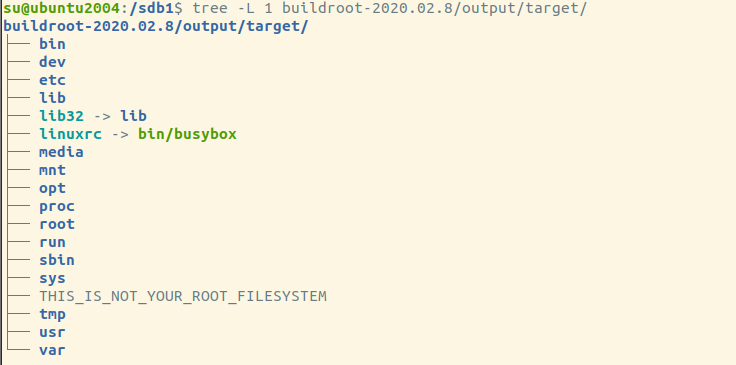
buildroot-target-rootfs

If we really dont want to have such “/init”, we can append the kernel args to workaround it.

rdinit=/linuxrc

Running kernel with rootfs

1
qemu-system-arm -M vexpress-a9 -m 512M -nographic -kernel zImage -dtb vexpress-v2p-ca9.dtb -append "root=/dev/mmcblk0 rw console=ttyAMA0" -sd a9rootfs.ext3

Here we use the partition at sd card as the rootfs.

static or shared for library

We can use installed arm-linux-gnueabi toolchain to build shared or static applications. For “shared” building we need runtime shared libraries(glibc and gcc runtime libraries such as libgcc libatomic) to rootfs.

If we want to use uclibc we need more hacks so we build ourselves toolchain using buildroot.

buildroot

Downloading

https://buildroot.org/downloads/buildroot-2020.02.8.tar.gz

Configuration and building

1
2
make menuconfig
make

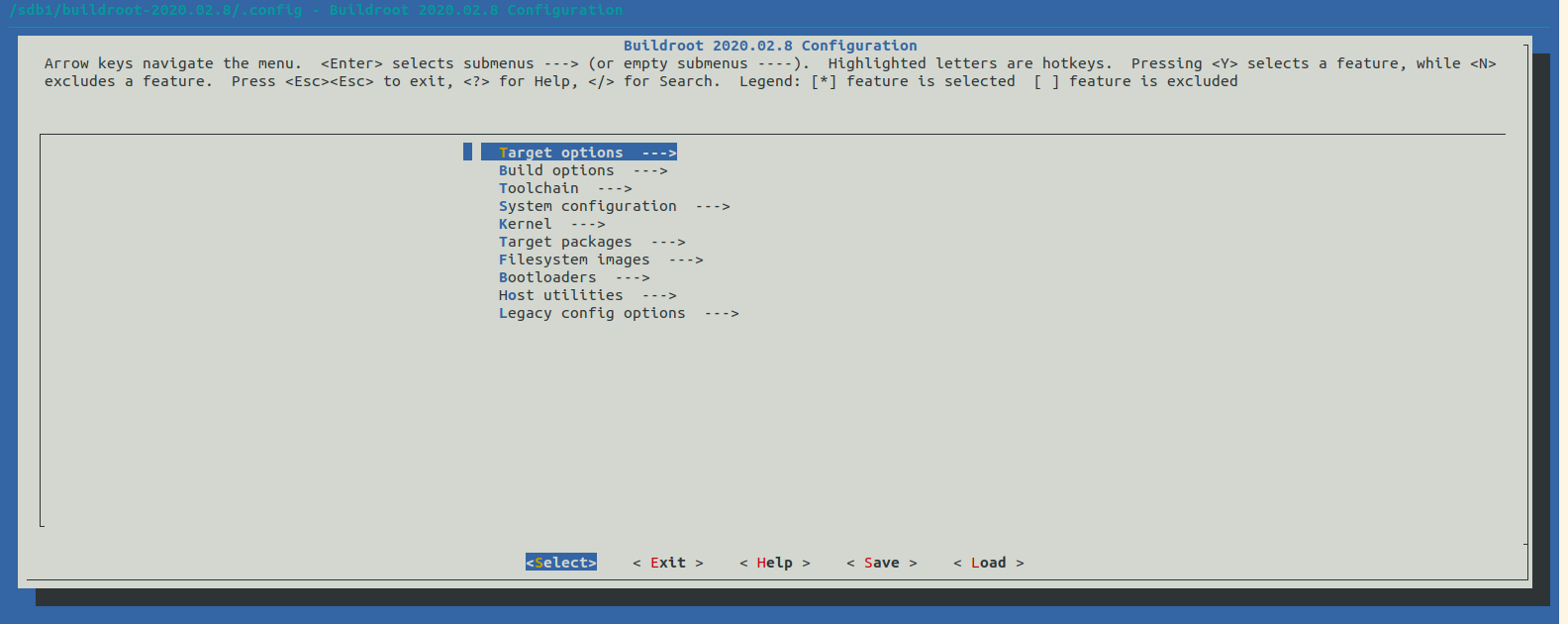
buildroot-main

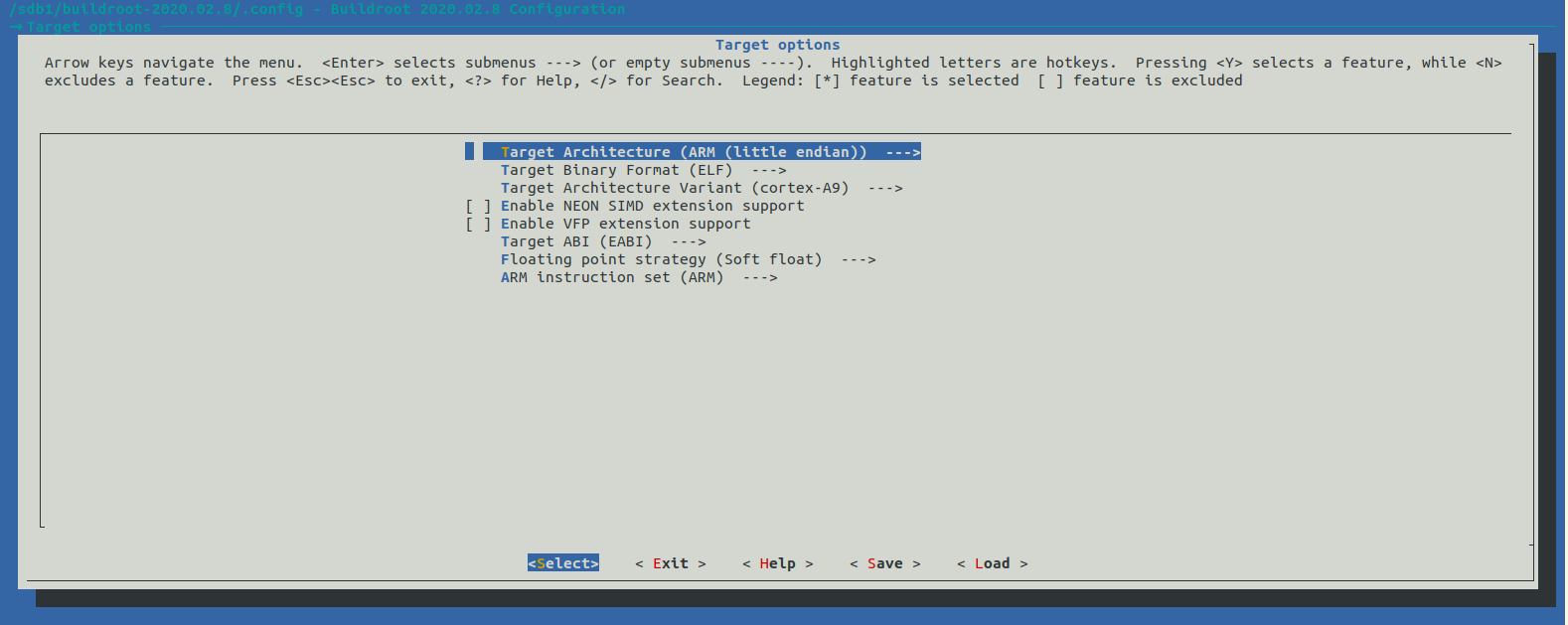
buildroot-target-settings

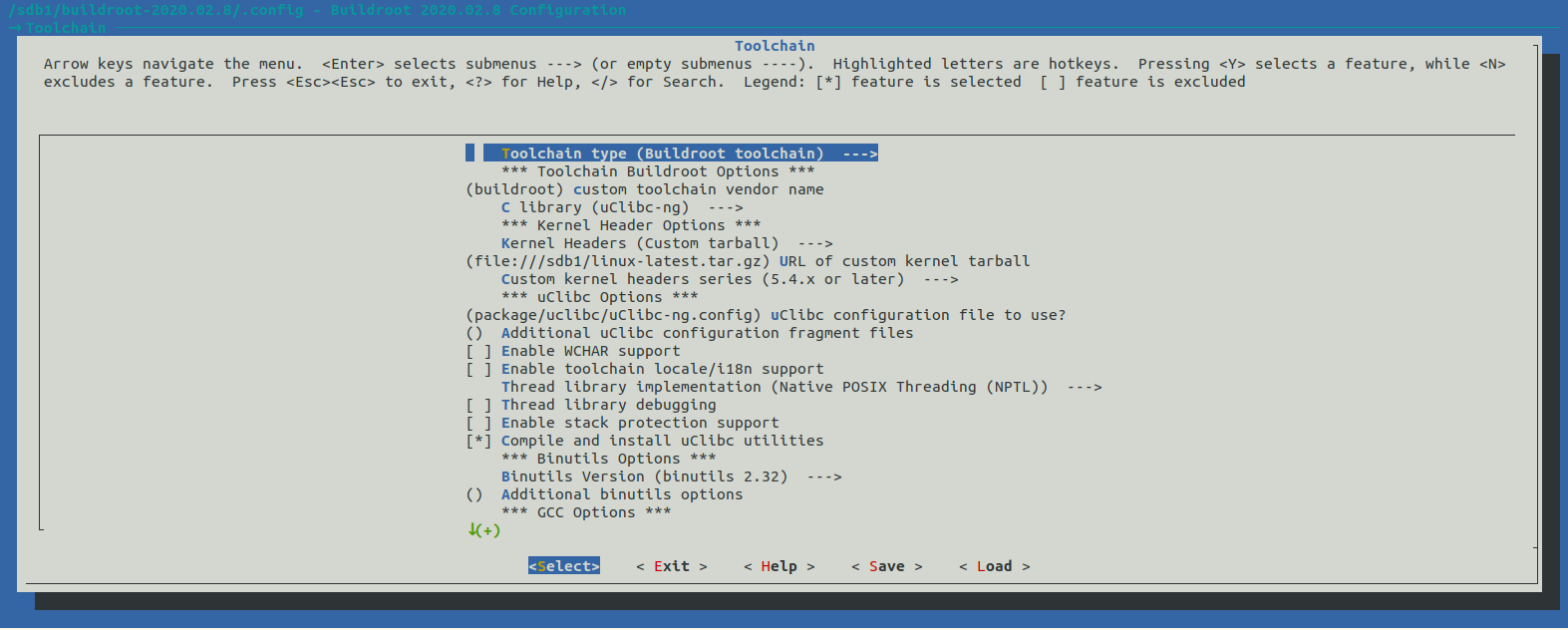
buildroot-toolchain-settings

we can set linux kernel headers which the toolchain may use and which lib we use (glibc, uclibc, musl).

1
2
3
4
5
6
7
8
9
10
11
12
13
14
15
16
17
18
19
20
21
22
23
24
su@ubuntu2004:/sdb1/buildroot-2020.02.8$ tree -L 1
.
├── arch
├── board
├── boot
├── CHANGES
├── Config.in
├── Config.in.legacy
├── configs
├── COPYING
├── DEVELOPERS
├── dl
├── docs
├── fs
├── linux
├── Makefile
├── Makefile.legacy
├── output
├── package
├── README
├── support
├── system
├── toolchain
└── utils

output/ has all things we need.

1
2
3
4
5
6
7
8
9
su@ubuntu2004:/sdb1/buildroot-2020.02.8$ tree output -L 1
output
├── build
├── host
├── images
├── staging -> /sdb1/buildroot-2020.02.8/output/host/arm-buildroot-linux-uclibcgnueabi/sysroot
└── target

5 directories, 0 files

host/ is our cross compile toolchain.

target/ has our rootfs directory which busybox and gcc/uclibc runtime shared libraries are all there.

1
2
3
4
5
6
7
8
9
10
11
12
13
14
15
16
17
18
19
20
21
22
23
24
25
26
27
28
29
30
31
32
33
34
35
36
37
38
39
40
41
42
43
44
45
46
47
48
49
50
51
52
su@ubuntu2004:/sdb1/buildroot-2020.02.8$ tree output/host/arm-buildroot-linux-uclibcgnueabi/sysroot/ -L 2
output/host/arm-buildroot-linux-uclibcgnueabi/sysroot/
├── bin
├── dev
│   ├── fd -> ../proc/self/fd
│   ├── stderr -> ../proc/self/fd/2
│   ├── stdin -> ../proc/self/fd/0
│   └── stdout -> ../proc/self/fd/1
├── etc
│   ├── group
│   ├── hosts
│   ├── mtab -> ../proc/self/mounts
│   ├── passwd
│   ├── profile
│   ├── profile.d
│   ├── protocols
│   ├── resolv.conf -> ../tmp/resolv.conf
│   ├── services
│   └── shadow
├── lib
│   ├── ld-uClibc-1.0.32.so
│   ├── ld-uClibc.so.0 -> ld-uClibc.so.1
│   ├── ld-uClibc.so.1 -> ld-uClibc-1.0.32.so
│   ├── libatomic.a
│   ├── libatomic.la
│   ├── libatomic.so -> libatomic.so.1.2.0
│   ├── libatomic.so.1 -> libatomic.so.1.2.0
│   ├── libatomic.so.1.2.0
│   ├── libc.so.0 -> libuClibc-1.0.32.so
│   ├── libc.so.1 -> libuClibc-1.0.32.so
│   ├── libgcc_s.so
│   ├── libgcc_s.so.1
│   └── libuClibc-1.0.32.so
├── lib32 -> lib
├── media
├── mnt
├── opt
├── proc
├── root
├── run
├── sbin
├── sys
├── tmp
└── usr
├── bin
├── include
├── lib
├── lib32 -> lib
├── sbin
└── share

22 directories, 26 files

Building hello-world using our toolchain

1
/sdb1/buildroot-2020.02.8/output/host/bin/arm-buildroot-linux-uclibcgnueabi-gcc hello.c -o hello
1
2
su@ubuntu2004:/sdb1/hello-world$ file hello
hello: ELF 32-bit LSB executable, ARM, EABI5 version 1 (SYSV), dynamically linked, interpreter /lib/ld-uClibc.so.0, not stripped

Building a application using our self-building toolchain.

Generating our custom rootfs

1
2
3
4
5
6
7
8
9
10
11
12
13
14
15
16
17
18
19
20
21
22
23
24
25
26
27
#!/bin/bash

base=`pwd`
tmpfs=/_tmpfs

sudo rm -rf rootfs
sudo rm -rf ${tmpfs}
sudo rm -f a9rootfs.ext3

sudo mkdir rootfs
sudo cp /sdb1/buildroot-2020.02.8/output/target/* rootfs/ -raf

sudo mknod rootfs/dev/tty1 c 4 1
sudo mknod rootfs/dev/tty2 c 4 2
sudo mknod rootfs/dev/tty3 c 4 3
sudo mknod rootfs/dev/tty4 c 4 4
sudo mknod rootfs/dev/console c 5 1
sudo mknod rootfs/dev/null c 1 3

sudo dd if=/dev/zero of=a9rootfs.ext3 bs=1M count=64

sudo mkfs.ext3 a9rootfs.ext3
sudo mkdir -p ${tmpfs}
sudo chmod 777 ${tmpfs}
sudo mount -t ext3 a9rootfs.ext3 ${tmpfs}/ -o loop
sudo cp -r rootfs/* ${tmpfs}/
sudo umount ${tmpfs}

We should create all the needed device files by ourselves!

Running the kernel and rootfs

1
sudo qemu-system-arm -M vexpress-a9 -m 512M -kernel vexpress_a9/arch/arm/boot/zImage -dtb vexpress_a9/arch/arm/boot/dts/vexpress-v2p-ca9.dtb -nographic -append "root=/dev/mmcblk0 rw console=ttyAMA0" -sd a9rootfs.ext3

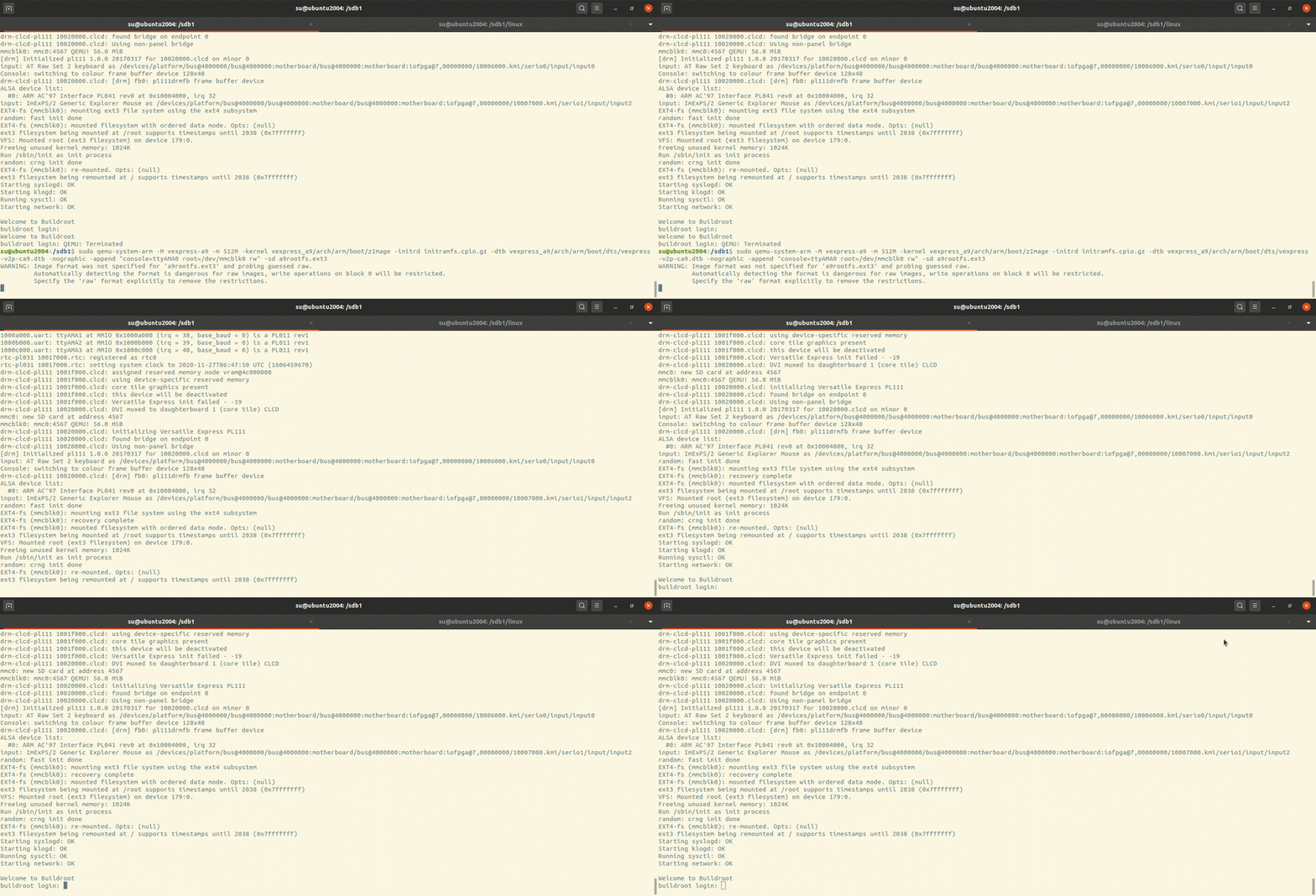
Running example:

kernel-sd-rootfs

Making firmware

Now we’ve building u-boot, kernel, dtb, rootfs. It’s time for us to custom our firmware.

Defining default u-boot arguments

1
2
3
4
5
6
7
8
9
10
11
12
#define CONFIG_EXTR_ENV_SETTINGS \
CONFIG_PLATFORM_ENV_SETTINGS \
BOOTENV \
"console=ttyAMA0,38400n8\0" \
"root=/dev/mtdblock2\0" \
"rootfstype=jffs2\0" \
"flashargs=setenv bootargs root=${root} rw rootfstype=${rootfstype} console=${console}\0" \
"bootflash=run flashargs; " \
"cp 40000000 60003000 500000; " \
"cp 40700000 61000000 100000; " \
"bootm 60003000 - 61000000\0" \
"fdtfile=" CONFIG_DEFAULT_FDT_FILE "\0"

Generating firmware

1
2
3
4
5
6
7
8
9
10
11
12
13
14
15
#!/bin/bash
# create nor flash image
dd if=/dev/zero if=firmware.bin bs=1M count=64

# kernel 0-7M
dd if=vexpress-a9/arch/arm/boot/uImage of=firmware.bin bs=1M seek=0 conv=notrunc

# kernel 7-8M
dd if=vexpress-a9/arch/arm/boot/dts/vexpress-v2p-ca.dtb of=firmware.bin bs=1M seek=7 conv=notrunc

# rootfs 8-64M
dd if=a9rootfs.jffs2 of=firmware.bin bs=1M seek=8 conv=notrunc

sync
echo "firmware is ok!"

Running firmware

1
qemu-system-arm -M vexpress-a9 -nographic -m 512M -kernel u-boot -pflash ../firmware.bin

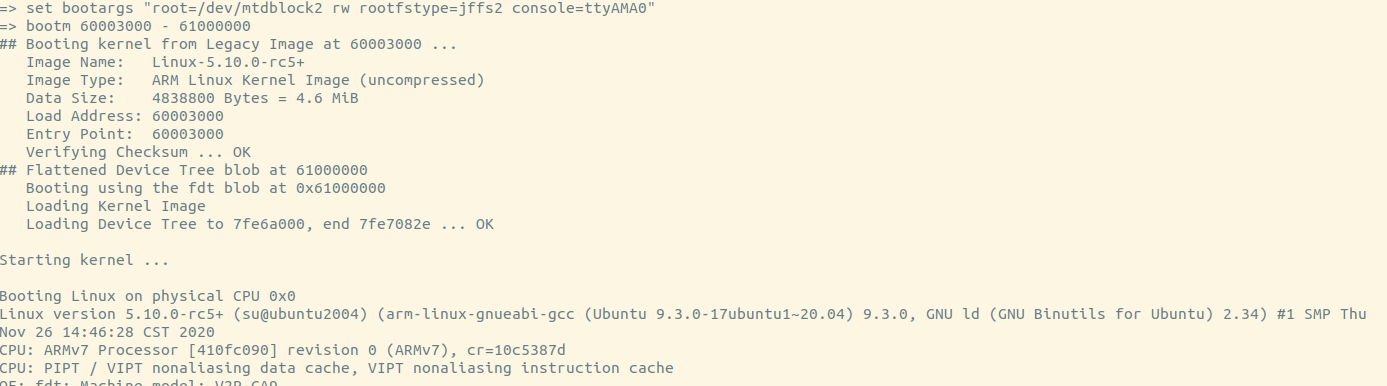
u-boo-kernel-jffs2

Using tftp

1
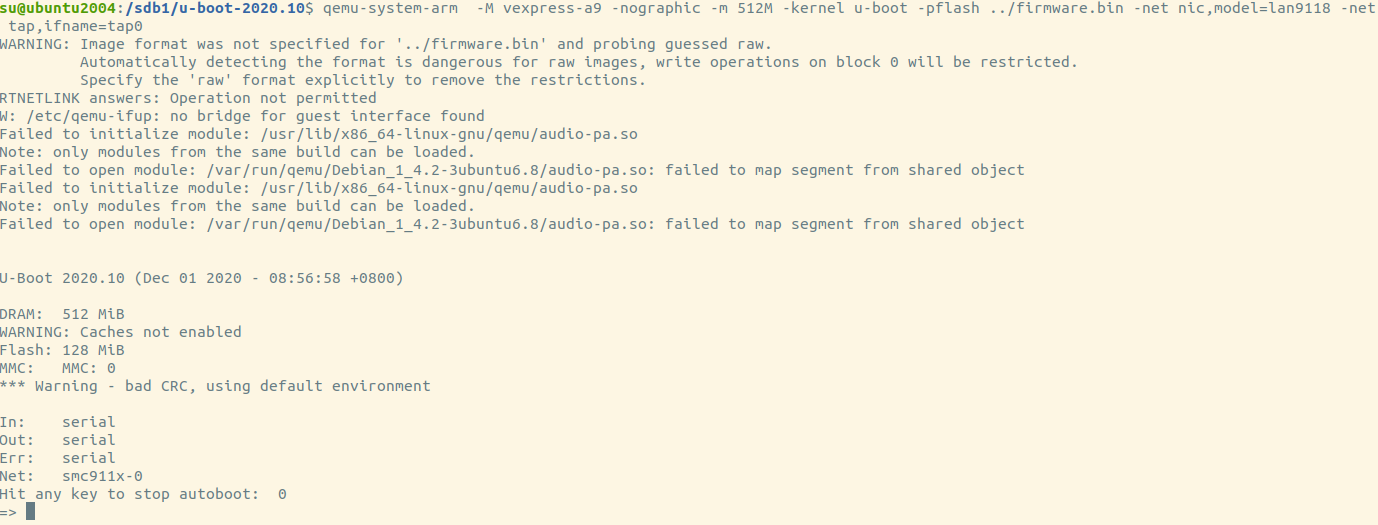
qemu-system-arm -M vexpress-a9 -nographic -m 512M -kernel u-boot -pflash ../firmware.bin -net nic,model=lan9118 -net tap,ifname=tap0

“-net nic,model=lan9118 -net tap,ifname=tap0” for qemu. It’ll use tap0 as it’s simulated nic.

1
2
3
4
5
6
7
8
9
10
11
12
# create tap0
sudo tunctl -u $(whoami) -t tap0
# create br0
sudo brctl addbr br0
# add tap0 to br0
sudo brctl addif br0 tap0
# bring up br0
sudo ifconfig br0 up
# bring up tap0
sudo ifconfig tap0 up
# setting ip of br0
sudo ifconfig br0 192.168.100.1/24

u-boot-with-nic-0

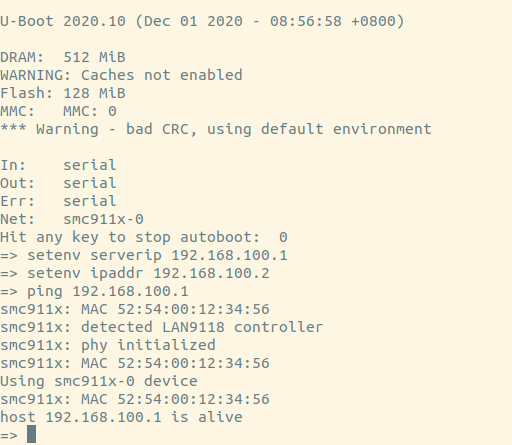
u-boot-ip-settings

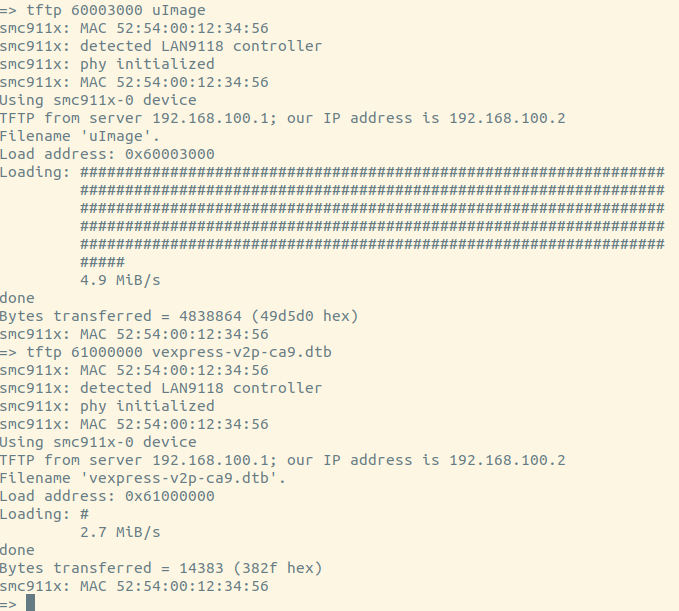
u-boot-tftp-files

u-boot-set-bootargs

So we can update kernel or rootfs by network now!

References

  1. understanding-how-bootloader-works-by-creating-your-own-firmware
  2. arm-emulated-environment-iotsec-qemu
  3. howto-initramfs-image
  4. How can I print more debug information from U-boot
  5. Build and run minimal Linux / Busybox systems in Qemu
  6. Using the initial RAM disk
  7. arm-emulated-environment-iotsec-qemu
  8. Passing Kernel Arguments
  9. how to adress flash memory in Linux

问题

ARM嵌入式开发,必定涉及到交叉编译工具链问题,下载交叉编译
工具链时总会有多个选择,我们该选择哪个工具链呢?

我们需要区分armel armhf arm64。

  1. armel
    ARM EABI(armel)支持老的32位arm。

  2. armhf
    较新的arm hard-float(armhf)支持新一点的32位arm,FPU没有标准化。

  3. arm64
    64位的arm支最新的64位arm,默认都带FPU了,已经标准化了。

背景知识

为何会有如此多种类的工具链需要选择呢?这有arm的历史背景有关。

其实最开始的只有一种arm,后来由于诸多原因如端模式到浮点的支持,它已经被被废弃了,后来的arm EABI (armel)取代了它。

armel(arm eabi little endian)仅仅是个名字而已,用于和老的版本做区分,可以认为它仅仅是对arm最基本的支持,可以被任何硬件运行。

armhf支持硬件FPU,计算更快,而armel则需要对浮点数模拟计算。

arm64默认就支持FPU。

gcc编译的时候,使用-mfloat-abi选项来指定浮点运算使用的
是哪种,soft不使用fpu,armel使用fpu,使用普通寄存器,armhf
使用fpu,使用fpu的寄存器。

installation

1
2
apt install glade
apt install libgtk-3-dev

安装glade设计工具,安装gtk开发包(头文件,pkgconfig的配置文件)。

hello world

1
2
3
4
5
6
7
8
9
10
11
12
13
14
15
16
17
18
19
20
21
#include <gtk/gtk.h>

static void activate(GtkApplication* app, gpointer user_data) {
GtkWidget* window;

window = gtk_application_window_new(app);
gtk_window_set_title(GTK_WINDOW(window), "window");
gtk_window_set_default_size(GTK_WINDOW(window), 200, 200);
gtk_widget_show_all(window);
}

int main(int argc, char** argv) {
GtkApplication *app;
int status;

app = gtk_application_new("org.gtk.example", G_APPLICATION_FLAGS_NONE);
g_signal_connect(app, "activate", G_CALLBACK(activate), NULL);
status = g_application_run(G_APPLICATION(app), argc, argv);
g_object_unref(app);
return status;
}

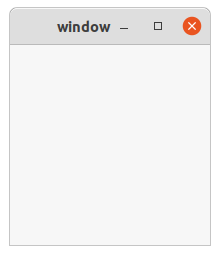
glade设计最简单的窗口。

1
pkg-config --cflags gtk+-3.0

获取编译选项

1
pkg-config --libs gtk+-3.0

获取链接库

1
g++ `pkg-config --cflags gtk+-3.0` main.c `pkg-config --libs gtk+-3.0` -rdynamic -o main

运行

例子