Say what you do and do what you say

0%

问题

近期遇到松散源路由报文通信失败,通过systemtap可以很快定位报文丢弃在何处。

直接上探测脚本:

1
2
3
4
5
6
7
8
9
10
11
12
13
14
15
16
17
18
19
20
21
22
23
24
25
probe begin()
{
print("Begin probe..\n")
}
probe end()
{
print("End probe.\n")
}
probe kernel.function("icmp_echo")
{
print_backtrace()//调用栈回溯
printf("%s\n",pp())//调用点
}
probe kernel.statement("*@net/ipv4/ip_input.c:341")
{
printf("%s\n",pp())
}
probe kernel.function("ip_options_compile").return
{
printf("ip_options_compile return:%d\n",$return)
}
probe timer.ms(10000)
{
exit()
}

在报文路径上增加探测点直接定位出丢包位置。

分析

这个具体问题是在函数static inline bool ip_rcv_options(struct sk_buff *skb)中如果源路由未打开则直接drop。

打开内核中源路由选项,通信正常。

在分析异常调用栈需要了解参数传递细节,在这里整理一下x86_64调用约定。

通过函数的汇编语句分析调用约定

栈帧布局

1
2
3
4
5
6
7
8
9
10
11
.text
foo:
push %rbp
mov %rsp,%rbp

[retaddr][old rbp]
^
|
rbp/rsp
8(%rbp): return address
0(%rbp): old %rbp

上面是foo函数的汇编语句,在函数入口处,%rsp指向返回地址,重新设置%rbp指向当前栈帧。

局部变量

1
2
3
4
5
6
7
8
9
10
foo:
push %rbp
mov %rsp,%rbp
sub $16,%rsp # local var spaces

[retaddr][old rbp][local vars]
high addr ^ ^ low addr
| |
rbp rsp
-8(%rbp):local vars

如果在栈上分配局部变量,通过%rbp访问。-8(%rbp)访问第一个局部变量,依次类推访问其它局部变量。

返回地址

1
2
3
4
5
6
7
8
9
10
11
12
13
foo:
push %rbp
mov %rsp,%rbp
sub $16,%rsp # local var spaces
...
add $16,%rsp # balance stack
pop %rbp # restore stack frame pointer
ret # return to caller
[retaddr][old rbp][local vars]
^ ^
| |
rbp rsp
-8(%rbp):local vars

在使用完局部变量需要把对应栈空间释放,平衡堆栈,最后ret返回caller处。

参数传递

1
2
3
4
5
6
7
8
9
10
11
12
13
14
15
16
17
18
19
20
21
22
call conventions:
void foo(int a,int b,int c,int d,int e,int f,int g);
40053c: 6a 07 pushq $0x7 # seventh use stack
40053e: 41 b9 06 00 00 00 mov $0x6,%r9d # sixth
400544: 41 b8 05 00 00 00 mov $0x5,%r8d # fifth
40054a: b9 04 00 00 00 mov $0x4,%ecx # fouth
40054f: ba 03 00 00 00 mov $0x3,%edx # third
400554: be 02 00 00 00 mov $0x2,%esi # second para
400559: bf 01 00 00 00 mov $0x1,%edi # first para
%rdi ->a
%rsi ->b
%rdx ->c
%rcx ->d
%r8 ->e
%r9 ->f
[parameters][retaddr][old rbp]
^
|
rbp/rsp
8(%rbp): return address
16(%rbp): the seventh parameter
24(%rbp): the eighth parameter

前6个参数使用寄存器传递,如果还有额外参数则通过堆栈传递。

以上式x86的调用约定,更正下x64的调用约定。

x64调用约定进行函数调用时栈必须是16字节对齐的,有人做过实验,只有macOS严格执行,
linux和windows似乎不严格执行该规定,即使不16字节对齐也没多大问题。

在windows上,x64调用约定使用rcx,rdx,r8,r9传参,但是需要在栈上给它们留空间,windows还有还有SEH结构化异常处理。

参考资料

  1. X86_calling_conventions
  2. The 64 bit x86 C Calling Convention

问题

syzkaller是Google团队开发的一款针对Linux内核进行模糊测试的开源工具,目前还在不断的维护之中。
订阅了相关linux内核的邮件列表后,会收到google的sykaller发现的内核bug的相关报告。

1
2
3
4
5
6
7
8
9
10
11
12
13
14
15
16
17
18
19
20
21
22
23
24
25
26
27
28
29
30
31
32
33
34
35
36
37
38
39
40
41
42
43
44
45
46
47
48
49
50
51
52
53
54
55
56
57
58
59
60
61
62
63
64
65
66
67
68
69
70
71
72
73
74
75
76
77
78
79
80
81
82
83
84
85
86
87
88
89
90
91
92
93
94
95
96
97
98
99
100
101
102
103
104
105
106
107
108
109
110
111
112
113
114
115
116
117
118
119
120
121
122
123
124
125
126
127
128
129
130
131
132
133
134
135
136
137
138
139
140
141
142
143
144
145
146
147
Hello,
syzbot found the following crash on:
HEAD commit: 9221dced Merge tag 'for-linus-20190601' of git://git.kerne..
git tree: upstream
console output: https://syzkaller.appspot.com/x/log.txt?x=114cdc0ea00000
kernel config: https://syzkaller.appspot.com/x/.config?x=1fa7e451a5cac069
dashboard link: https://syzkaller.appspot.com/bug?extid=a9e23ea2aa21044c2798
compiler: gcc (GCC) 9.0.0 20181231 (experimental)
userspace arch: i386
Unfortunately, I don't have any reproducer for this crash yet.
IMPORTANT: if you fix the bug, please add the following tag to the commit:
Reported-by: syzbot+a9e23ea2aa21044c2798@syzkaller.appspotmail.com
==================================================================
BUG: KASAN: slab-out-of-bounds in rt_cache_valid+0x158/0x190
net/ipv4/route.c:1556
Read of size 2 at addr ffff8880654f3ac7 by task syz-executor.0/26603
CPU: 0 PID: 26603 Comm: syz-executor.0 Not tainted 5.2.0-rc2+ #9 Hardware name: Google Google Compute Engine/Google Compute Engine, BIOS Google 01/01/2011 Call Trace:
__dump_stack lib/dump_stack.c:77 [inline]
dump_stack+0x172/0x1f0 lib/dump_stack.c:113
print_address_description.cold+0x7c/0x20d mm/kasan/report.c:188
__kasan_report.cold+0x1b/0x40 mm/kasan/report.c:317
kasan_report+0x12/0x20 mm/kasan/common.c:614
__asan_report_load2_noabort+0x14/0x20 mm/kasan/generic_report.c:130
rt_cache_valid+0x158/0x190 net/ipv4/route.c:1556
__mkroute_output net/ipv4/route.c:2332 [inline]
ip_route_output_key_hash_rcu+0x819/0x2d50 net/ipv4/route.c:2564
ip_route_output_key_hash+0x1ef/0x360 net/ipv4/route.c:2393
__ip_route_output_key include/net/route.h:125 [inline]
ip_route_output_flow+0x28/0xc0 net/ipv4/route.c:2651
ip_route_output_key include/net/route.h:135 [inline]
sctp_v4_get_dst+0x467/0x1260 net/sctp/protocol.c:435
sctp_transport_route+0x12d/0x360 net/sctp/transport.c:297
sctp_assoc_add_peer+0x53e/0xfc0 net/sctp/associola.c:663
sctp_process_param net/sctp/sm_make_chunk.c:2531 [inline]
sctp_process_init+0x2491/0x2b10 net/sctp/sm_make_chunk.c:2344
sctp_cmd_process_init net/sctp/sm_sideeffect.c:667 [inline]
sctp_cmd_interpreter net/sctp/sm_sideeffect.c:1369 [inline]
sctp_side_effects net/sctp/sm_sideeffect.c:1179 [inline]
sctp_do_sm+0x3a30/0x50e0 net/sctp/sm_sideeffect.c:1150
sctp_assoc_bh_rcv+0x343/0x660 net/sctp/associola.c:1059
sctp_inq_push+0x1e4/0x280 net/sctp/inqueue.c:80
sctp_backlog_rcv+0x196/0xbe0 net/sctp/input.c:339
sk_backlog_rcv include/net/sock.h:945 [inline]
__release_sock+0x129/0x390 net/core/sock.c:2412
release_sock+0x59/0x1c0 net/core/sock.c:2928
sctp_wait_for_connect+0x316/0x540 net/sctp/socket.c:9039
__sctp_connect+0xab2/0xcd0 net/sctp/socket.c:1226
__sctp_setsockopt_connectx+0x133/0x1a0 net/sctp/socket.c:1334
sctp_setsockopt_connectx_old net/sctp/socket.c:1350 [inline]
sctp_setsockopt net/sctp/socket.c:4644 [inline]
sctp_setsockopt+0x22c0/0x6d10 net/sctp/socket.c:4608
compat_sock_common_setsockopt+0x106/0x140 net/core/sock.c:3137
__compat_sys_setsockopt+0x185/0x380 net/compat.c:383
__do_compat_sys_setsockopt net/compat.c:396 [inline]
__se_compat_sys_setsockopt net/compat.c:393 [inline]
__ia32_compat_sys_setsockopt+0xbd/0x150 net/compat.c:393
do_syscall_32_irqs_on arch/x86/entry/common.c:337 [inline]
do_fast_syscall_32+0x27b/0xd7d arch/x86/entry/common.c:408
entry_SYSENTER_compat+0x70/0x7f arch/x86/entry/entry_64_compat.S:139
RIP: 0023:0xf7ff5849
Code: 85 d2 74 02 89 0a 5b 5d c3 8b 04 24 c3 8b 14 24 c3 8b 3c 24 c3 90 90
90 90 90 90 90 90 90 90 90 90 51 52 55 89 e5 0f 34 cd 80 <5d> 5a 59 c3 90
90 90 90 eb 0d 90 90 90 90 90 90 90 90 90 90 90 90
RSP: 002b:00000000f5df10cc EFLAGS: 00000296 ORIG_RAX: 000000000000016e
RAX: ffffffffffffffda RBX: 0000000000000007 RCX: 0000000000000084
RDX: 000000000000006b RSI: 000000002055bfe4 RDI: 000000000000001c
RBP: 0000000000000000 R08: 0000000000000000 R09: 0000000000000000
R10: 0000000000000000 R11: 0000000000000000 R12: 0000000000000000
R13: 0000000000000000 R14: 0000000000000000 R15: 0000000000000000
Allocated by task 480:
save_stack+0x23/0x90 mm/kasan/common.c:71
set_track mm/kasan/common.c:79 [inline]
__kasan_kmalloc mm/kasan/common.c:489 [inline]
__kasan_kmalloc.constprop.0+0xcf/0xe0 mm/kasan/common.c:462
kasan_slab_alloc+0xf/0x20 mm/kasan/common.c:497
slab_post_alloc_hook mm/slab.h:437 [inline]
slab_alloc mm/slab.c:3326 [inline]
kmem_cache_alloc+0x11a/0x6f0 mm/slab.c:3488
dst_alloc+0x10e/0x200 net/core/dst.c:93
rt_dst_alloc+0x83/0x3f0 net/ipv4/route.c:1624
__mkroute_output net/ipv4/route.c:2337 [inline]
ip_route_output_key_hash_rcu+0x8f3/0x2d50 net/ipv4/route.c:2564
ip_route_output_key_hash+0x1ef/0x360 net/ipv4/route.c:2393
__ip_route_output_key include/net/route.h:125 [inline]
ip_route_output_flow+0x28/0xc0 net/ipv4/route.c:2651
ip_route_output_key include/net/route.h:135 [inline]
sctp_v4_get_dst+0x467/0x1260 net/sctp/protocol.c:435
sctp_transport_route+0x12d/0x360 net/sctp/transport.c:297
sctp_assoc_add_peer+0x53e/0xfc0 net/sctp/associola.c:663
sctp_process_param net/sctp/sm_make_chunk.c:2531 [inline]
sctp_process_init+0x2491/0x2b10 net/sctp/sm_make_chunk.c:2344
sctp_sf_do_unexpected_init net/sctp/sm_statefuns.c:1541 [inline]
sctp_sf_do_unexpected_init.isra.0+0x7cd/0x1350 net/sctp/sm_statefuns.c:1441
sctp_sf_do_5_2_1_siminit+0x35/0x40 net/sctp/sm_statefuns.c:1670
sctp_do_sm+0x121/0x50e0 net/sctp/sm_sideeffect.c:1147
sctp_assoc_bh_rcv+0x343/0x660 net/sctp/associola.c:1059
sctp_inq_push+0x1e4/0x280 net/sctp/inqueue.c:80
sctp_backlog_rcv+0x196/0xbe0 net/sctp/input.c:339
sk_backlog_rcv include/net/sock.h:945 [inline]
__release_sock+0x129/0x390 net/core/sock.c:2412
release_sock+0x59/0x1c0 net/core/sock.c:2928
sctp_wait_for_connect+0x316/0x540 net/sctp/socket.c:9039
__sctp_connect+0xab2/0xcd0 net/sctp/socket.c:1226
sctp_connect net/sctp/socket.c:4846 [inline]
sctp_inet_connect+0x29c/0x340 net/sctp/socket.c:4862
__sys_connect+0x264/0x330 net/socket.c:1834
__do_sys_connect net/socket.c:1845 [inline]
__se_sys_connect net/socket.c:1842 [inline]
__ia32_sys_connect+0x72/0xb0 net/socket.c:1842
do_syscall_32_irqs_on arch/x86/entry/common.c:337 [inline]
do_fast_syscall_32+0x27b/0xd7d arch/x86/entry/common.c:408
entry_SYSENTER_compat+0x70/0x7f arch/x86/entry/entry_64_compat.S:139
Freed by task 9:
save_stack+0x23/0x90 mm/kasan/common.c:71
set_track mm/kasan/common.c:79 [inline]
__kasan_slab_free+0x102/0x150 mm/kasan/common.c:451
kasan_slab_free+0xe/0x10 mm/kasan/common.c:459
__cache_free mm/slab.c:3432 [inline]
kmem_cache_free+0x86/0x260 mm/slab.c:3698
dst_destroy+0x29e/0x3c0 net/core/dst.c:129
dst_destroy_rcu+0x16/0x19 net/core/dst.c:142
__rcu_reclaim kernel/rcu/rcu.h:222 [inline]
rcu_do_batch kernel/rcu/tree.c:2092 [inline]
invoke_rcu_callbacks kernel/rcu/tree.c:2310 [inline]
rcu_core+0xba5/0x1500 kernel/rcu/tree.c:2291
__do_softirq+0x25c/0x94c kernel/softirq.c:293
The buggy address belongs to the object at ffff8880654f3a00
which belongs to the cache ip_dst_cache of size 176 The buggy address is located 23 bytes to the right of
176-byte region [ffff8880654f3a00, ffff8880654f3ab0) The buggy address belongs to the page:
page:ffffea0001953cc0 refcount:1 mapcount:0 mapping:ffff8880a76ad600
index:0xffff8880654f3c00
flags: 0x1fffc0000000200(slab)
raw: 01fffc0000000200 ffffea00026be808 ffffea000181c088 ffff8880a76ad600
raw: ffff8880654f3c00 ffff8880654f3000 0000000100000002 0000000000000000 page dumped because: kasan: bad access detected
Memory state around the buggy address:
ffff8880654f3980: fb fb fb fb fb fb fc fc fc fc fc fc fc fc fc fc
ffff8880654f3a00: 00 00 00 00 00 00 00 00 00 00 00 00 00 00 00 00
ffff8880654f3a80: 00 00 00 00 00 00 fc fc fc fc fc fc fc fc fc fc
^
ffff8880654f3b00: fb fb fb fb fb fb fb fb fb fb fb fb fb fb fb fb
ffff8880654f3b80: fb fb fb fb fb fb fc fc fc fc fc fc fc fc fc fc ==================================================================

This bug is generated by a bot. It may contain errors.
See https://goo.gl/tpsmEJ for more information about syzbot.
syzbot engineers can be reached at syzkaller@googlegroups.com.
syzbot will keep track of this bug report. See:
https://goo.gl/tpsmEJ#status for how to communicate with syzbot.

分析

从上面的信息可以看出在rt_cache_valid中访问了已经释放的dst。rt_cache_valid函数在rcu读临界区内,
先检查下是否是rcu锁问题。rcu锁的作用是防止dst在有读者的时候被释放,而出问题代码本身位于读临界区,
此时dst的回收代码不会执行到。dst是正常引用计数到达0时被rcu softirq reclaim掉的。dst引用统计被put了
多次导致计数为0 被释放了。跟踪下sctp下dst的释放流程,sctp_transport_route先release dst再执行get_dst。
由于release dst不在rcu的读临界区,在dst引用计数为0导致dst被回收后,在执行get_dst流程时引用的dst早已
被rcu sofirq释放。最简单的修复把release dst也放到rcu读临界区,这样在release dst和get dst的时候不
会触发rcu softirq的reclaim动作。

OpenWrt是一个嵌入式的 Linux 发行版, 拥有强大的网络组件和扩展性,
常常被用于工控设备、电话、小型机器人、智能家居、路由器以及VOIP设备中。

很多采用openwrt的软路由的人更多的是使用openwrt的多拨实现带宽叠加。
其实openwrt多拨是基于内核的macvlan模块。

macvlan是什么?

在macvlan之前,我们只能为一个物理网络接口添加多个ip地址,却不能添
加多个mac地址。macvlan可以在一个物理网络接口上虚拟出多个虚拟网络
接口,每个虚拟接口可以独立配置mac和ip地址。这样物理网络接口相当于
实现了一个交换机,记录了mac和虚拟接口的对应关系。
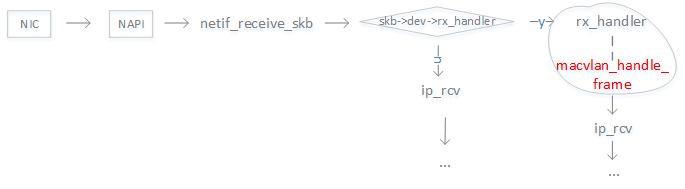
macvlan收包处理流程

macvlan收包

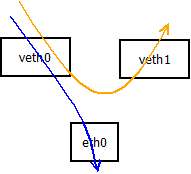
上图为内核的收包处理流程。内核为设置了macvlan的物理网络接口设置rx_handler函数,
在使用NAPI机制收到报文上送协议栈之前先执行macvlan_handle_frame。

macvlan_handle_frame函数根据二层头的目的mac地址判断是发给物理网络接口还是先发
给虚拟网络接口。设置skb->dev为macvlan设备,然后报文进入ip协议栈处理流程。
maclavn发包流程

macvlan发包

macvlan_queue_xmit是macvlan设备的发包函数,判断如果是桥模式则根据目的mac查找是否
是本机macvlan设备,如果是则直接发给本机macvlan设备执行netif_rx_internal。否则报文
通过底层设备发送出去。

总结

有个macvlan,我们就可以基于虚拟网络接口进行pppoe拨号,从而获取多个wan连接,实现多拨。

扩展阅读

  1. macvlan and ipvlan
  2. bridge vs macvlan

看完编译器领域的”龙书”,有必要对某些关键点做下总结。符号表穿插在整个编译的过程,
无意是最重要的组成部分。

符号表?

标识符的动态语义词典,贯穿编译的整个阶段,在编译的过程中不断更新。
类似人口大普查一样,把每个人信息都录入某个系统中,在需要时再查询。

符号表内容

  1. 名字

    标识符,用作查询关键字

    1
    2
    3
    4
    5
    6
    int a;
    int foo(int a,int b)
    {
    int c = a+b;
    return c;
    }
  2. 类型

    该标识符的数据类型及其相关信息

    1
    2
    3
    4
    5
    6
    int a;
    int foo(int a,int b)
    {
    int c = a+b;
    return c;
    }

    a,b,c是整数类型,foo是函数类型。

  3. 种类

    该标识符在源程序的语义角色

    1
    2
    3
    4
    5
    6
    int a;(1)
    int foo(int a,int b)(2)
    {
    int c = a+b;(3)
    return c;(4)
    }

    (1)中a是变量
    (2)中foo是函数,a和b是形参
    (3)中c是变量

  4. 地址

    与值单元相关的一些信息

符号表作用

  • 变量定义和重定义检查
  • 类型匹配检查
  • 数据越界和溢出检查
  • 值单元存储分配信息
  • 函数参数传递和校验

符号表组织和管理

  • 遇到说明性标识符则插入符号表并把语义信息插入表项中,使其指向相应表项
  • 遇到应用性标识符则查询符号表,使其指向相应表项

符号表查询和访问方式

  • 线性表
  • 顺序表
  • 索引表
  • 散列表

符号表的管理和维护

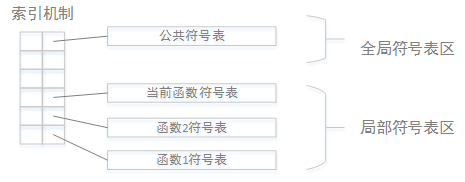
一个源文件有若干函数组成,通常每个函数对应一个符号表,此外还有一个公共符号表。

符号表如何管理取决于所属语言的程序结构,常见的实现方式是在内存设定一定长度的
符号表区,并建立适当的索引机制,访问相应的符号表。

如下图所示:
 symbol table

符号表的结构设计

1
2
3
4
5
6
7
int foo(int a,int b)
{
int x,y;
const pi=3.14;
x = a*a; y = b*b;
retrun pixy;
}

需要填入符号表的标识符:

标识符 语义属性
foo 函数,附加信息:类型,参数情况和入口地址
a 形参
b 形参
x 变量
y 变量
pi 常量

由于标识符种类不同,导致语义属性不尽相同

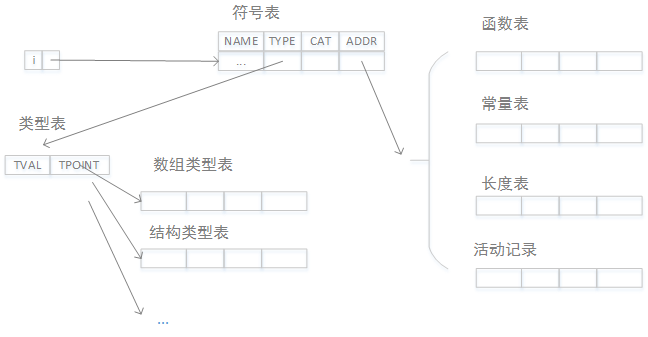
如何组织符号表?

下面是“龙书”中提到的一种符号表的体系结构:
 symbol table

说明:

名字 说明
NAME 标识符源码,内部码
TYPE 指针,指向类型表的表项
CAT 种类编码:函数f,变量v,类型t,常量c,传值形参vf,传地址形参vn
ADDR 指针,根据标识符种类不同,指向函数表,常量表等
  • 类型表
名字 说明
TVAL 类型编码:整型,浮点型,字符型,布尔型,数组型,结构型
TPOINT 指针,根据类型编码的不同,指向不同的信息表项 基本类型:空 数组类型:指向数组表项 结构类型:指向结构表项
  • 数组表
名字 说明
LOW 数组下届
UP 数组上届
CTP 成员类型指针,指向类型表中表项
CTLEN 成员类型长度,成员类型所占值单元长度
  • 函数表
名字 说明
OFF 函数的值单元地址
DAT 指针,指向函数的数据区
FN 参数个数
PAR 指针,指向形参表
ENT 函数运行首地址,运行时填写
  • 其它表

    • 常量表存放常量的初值
    • 长度表存放数据类型所占值单元的长度
  • 活动记录表
    一个函数虚拟的值单元存储分配表,在函数运行调用时用到故称活动记录。

符号表例子

1
2
3
4
5
6
7
int foo(int a,int b)
{
int x,y;
const pi=3.14;
x = a*a; y = b*b;
retrun pixy;
}

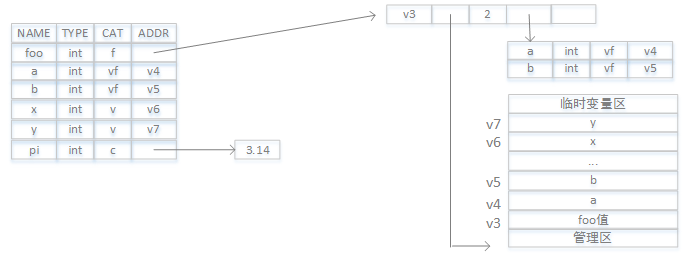
该函数经过语法分析后,填充如下的信息:

 symbol table

最近在某发行版遇到问题,大体情况是修改/etc/default/grub的定制脚本,
在BIOS和UEFI主板的机器上结果不同,后调查发现在UEFI机器上,grub的配置文件
位于Efi System Paition分区,而不是BIOS机器上的/boot/grub2下。

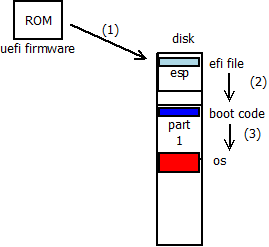
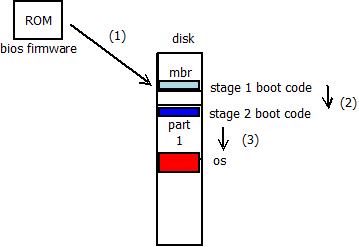
这里分析下BIOS和UEFI启动。
bios

 bios

  1. 上电,bios firmware开始执行,加载MBR(第一扇区)到指定位置(0x7c00)开始执行第一阶段启动代码(bootcode)

    第一阶段启动代码非常小,不超过1个扇区大小(扇区:512字节)

  2. stage 1代码负责加载并执行stage 2的代码

    stage 2代码(grub)功能强大,加载操作系统

  3. stage 2加载操作系统,操作系统启动

uefi

 uefi

  1. 上电,uefi firmware开始执行,加载ESP分区的efi文件执行(解释执行efi byte code)

    efi文件中是efi字节码,uefi固件内置efi解释器,用于执行这些代码

  2. efi bootcode加载引导程序(grub)并执行引导程序

    stage 2代码(grub)功能强大,加载操作系统

  3. stage 2加载操作系统,操作系统启动

区别

在系统启动上,除了1和2差别很大,后边系统启动完全一样了。

参考

  1. uefi vs bios
  2. Unified_Extensible_Firmware_Interface

一直以来更多的是使用c语言,看到python语言在云计算时代广泛运用,
想着如何用c编写模块供python调用。python的官方实现就是c语言实现的,
即cpython。python提供了运行时接口供我们编写c扩展模块。

linux发行版通常把头文件和库文件打包成xxxx-dev的包形式。我们需要
安装python-dev来编写python扩展。

1
2
3
4
5
6
7
8
9
10
11
12
13
14
15
16
17
18
19
20
21
22
23
24
25
26
27
28
29
30
31
32
33
34
35
#include <python.h> /* Python API to python runtime system */
static PyObject *SpamError;
/*
spam.system(string)
*/
static PyObject * spam_system(PyObject *self, PyObject *args)
{
const char *command;
int sts;
if (!PyArg_ParseTuple(args,"s",&command))
return NULL;
/*
run the command in another process until it runs done
*/
sts = system(command);
if (sts < 0) {
PyErr_SetString(SpamError,"System command failed");
}
return PyLong_FromLong(sts);
}
static PyMethodDef SpamMethods[] = {
{"system",spam_system,METH_VARARGS,"Execute a shell command."},
{NULL,NULL,0,NULL}
};
PyMODINIT_FUNC
initspam(void)
{
PyObject *m;
m = Py_InitModule("spam",SpamMethods);
if (!m)
return ;
SpamError = PyErr_NewException("spam.error",NULL,NULL);
Py_INCREF(SpamError);
PyModule_AddObject(m,"error",SpamError);
}

如果模块名为xxx则必须提供xxxinit的函数。在python解释器加载模块的时候会寻找
模块动态库文件中导出的xxxinit函数。

mutter problem

gnome hangup after 49.7 days.

mutter?

mutter是GNOME3的窗口管理器,用来取代Metacity。

https://zh.wikipedia.org/wiki/Mutter

patch info?

[backends/x11: Fix time-comparison bug causing hang]https://gitlab.gnome.org/GNOME/mutter/-/merge_requests/12/diffs?commit_id=102abeedf4d3a804bed2e1930a93a52e4475a3bb

A comparison in translate_device_event() does not account for the fact
that X’s clock wraps about every 49.7 days. When triggered, this causes
an unresponsive GUI.
Replace simple less-than comparison with XSERVER_TIME_IS_BEFORE macro,
which accounts for the wrapping of X’s clock.

详细的提交记录

1
2
3
4
5
6
7
8
9
10
11
12
13
14
15
16
17
18
19
20
21
22
23
24
25
26
27
28
29
30
31
32
33
34
35
commit 942883577ea700f0f419c335185891ff9a02e07b
Author: Jonas Ådahl <jadahl@gmail.com>
Date: Fri Oct 25 10:06:55 2019 +0200

x11: Limit touch replay pointer events to when replaying

When a touch sequence was rejected, the emulated pointer events would be
replayed with old timestamps. This caused issues with grabs as they
would be ignored due to being too old. This was mitigated by making sure
device event timestamps never travelled back in time by tampering with
any event that had a timestamp seemingly in the past.

This failed when the most recent timestamp that had been received were
much older than the timestamp of the new event. This could for example
happen when a session was left not interacted with for 40+ days or so;
when interacted with again, as any new timestamp would according to
XSERVER_TIME_IS_BEFORE() still be in the past compared to the "most
recent" one. The effect is that we'd always use the `latest_evtime` for
all new device events without ever updating it.

The end result of this was that passive grabs would become active when
interacted with, but would then newer be released, as the timestamps to
XIAllowEvents() would out of date, resulting in the desktop effectively
freezing, as the Shell would have an active pointer grab.

To avoid the situation where we get stuck with an old `latest_evtime`
timestamp, limit the tampering with device event timestamp to 1) only
pointer events, and 2) only during the replay sequence. The second part
is implemented by sending an asynchronous message via the X server after
rejecting a touch sequence, only potentially tampering with the device
event timestamps until the reply. This should avoid the stuck timestamp
as in those situations, we'll always have a relatively up to date
`latest_evtime` meaning XSERVER_TIME_IS_BEFORE() will not get confused.

https://gitlab.gnome.org/GNOME/mutter/merge_requests/886

指针焦点被某个程序grab后,由于时间戳不对一直得不到释放。指针事件无法正确传递导致
桌面无响应。

代码

1
2
3
4
5
6
7
8
9
10
11
12
13
14
15
16
17
18
19
20
21
22
23
24
static void
translate_device_event (MetaBackendX11 *x11,
XIDeviceEvent *device_event)
{
MetaBackendX11Private *priv = meta_backend_x11_get_instance_private (x11);

meta_backend_x11_translate_device_event (x11, device_event);

if (!device_event->send_event && device_event->time != CurrentTime)
{
- if (device_event->time < priv->latest_evtime)
+ if (XSERVER_TIME_IS_BEFORE (device_event->time, priv->latest_evtime))
{
/* Emulated pointer events received after XIRejectTouch is received
* on a passive touch grab will contain older timestamps, update those
* so we dont get InvalidTime at grabs.
*/
device_event->time = priv->latest_evtime;
}

/* Update the internal latest evtime, for any possible later use */
priv->latest_evtime = device_event->time;
}
}

time是32位无符号整数,单位是ms,大约49.7天会溢出。在溢出后,导致事件的时间戳
被设置位很久之前的值,在提交给xserver时无效。

XSERVER_TIME_IS_BEFORE

1
2
3
4
5
6
7
8
9
10
11
12
13
14
15
16
17
18
19
20
21
/* Xserver time can wraparound, thus comparing two timestamps needs to take
* this into account. Here's a little macro to help out. If no wraparound
* has occurred, this is equivalent to
* time1 < time2
* Of course, the rest of the ugliness of this macro comes from accounting
* for the fact that wraparound can occur and the fact that a timestamp of
* 0 must be special-cased since it means older than anything else.
*
* Note that this is NOT an equivalent for time1 <= time2; if that's what
* you need then you'll need to swap the order of the arguments and negate
* the result.
*/
#define XSERVER_TIME_IS_BEFORE_ASSUMING_REAL_TIMESTAMPS(time1, time2) \
( (( (time1) < (time2) ) && ( (time2) - (time1) < ((guint32)-1)/2 )) || \
(( (time1) > (time2) ) && ( (time1) - (time2) > ((guint32)-1)/2 )) \
)
#define XSERVER_TIME_IS_BEFORE(time1, time2) \
( (time1) == 0 || \
(XSERVER_TIME_IS_BEFORE_ASSUMING_REAL_TIMESTAMPS(time1, time2) && \
(time2) != 0) \
)

根据patch的修改,如果时间戳不对,则窗口不响应。

X服务器对时间戳的使用例子:

1
2
3
4
time = ClientTimeToServerTime(ctime);
if ((CompareTimeStamps(time, currentTime) == LATER) ||
(CompareTimeStamps(time, grabInfo->grabTime) == EARLIER)
xxx

这里先调用ClientTimeToServerTime把32位无符号转换为
TimeStamp类型,然后和currentTime进行比较。

mutter程序

1
2
3
4
5
6
7
8
9
10
11
main
\--meta_init
\--- meta_clutter_init
\-- source = g_source_new (&event_funcs, sizeof (GSource));
\-- meta_backend_post_init
\-- META_BACKEND_GET_CLASS (backend)->post_init (backend);
\-- x_event_source_new
\-- source = g_source_new (&x_event_funcs, sizeof (XEventSource));
\--- meta_main_loop = g_main_loop_new (NULL, FALSE);
\--meta_run
\--- g_main_loop_run (meta_main_loop);

mutter是基于glib的程序,通过事件源机制注册事件处理函数。

meta_backend_post_init中创建的事件源处理函数会调用XPending把窗口事件取出来,然后dispatch。
mutter作为窗口管理器会”收到”很多窗口的事件(实际也是通过xserver发过来,见substructure redirection),主要是窗口事件,这样mutter负责把窗口消息再发给
X服务器。

CurrentTime

1
2
/usr/include/X11/X.h:139:
#define CurrentTime 0L /* special Time */

xserver如果使用client传递过来的timestamp

1
2
3
4
5
6
7
8
9
10
11
12
13
14
15
16
17
18
19
20
21
22
23
24
./dix/dixutils.c
/*
* convert client times to server TimeStamps
*/
#define HALFMONTH ((unsigned long) 1<<31)
TimeStamp
ClientTimeToServerTime(CARD32 c)
{
TimeStamp ts;

if (c == CurrentTime)
return currentTime;
ts.months = currentTime.months;
ts.milliseconds = c;
if (c > currentTime.milliseconds) {
if (((unsigned long) c - currentTime.milliseconds) > HALFMONTH)
ts.months -= 1;
}
else if (c < currentTime.milliseconds) {
if (((unsigned long) currentTime.milliseconds - c) > HALFMONTH)
ts.months += 1;
}
return ts;
}

xserver如何更新currentTime

1
2
3
4
5
6
7
8
9
10
11
12
13
14
15
16
17
18
./dix/dispatch.c
void
UpdateCurrentTime(void)
{
TimeStamp systime;

/* To avoid time running backwards, we must call GetTimeInMillis before
* calling ProcessInputEvents.
*/
systime.months = currentTime.months;
systime.milliseconds = GetTimeInMillis();
if (systime.milliseconds < currentTime.milliseconds)
systime.months++;
if (InputCheckPending())
ProcessInputEvents();
if (CompareTimeStamps(systime, currentTime) == LATER)
currentTime = systime;
}

references

  1. x basics
  2. x concepts
  3. X Window System Protocol
  4. How X Window Managers Work, And How To Write One

linux发行版DVD安装机制分析

想知道linux发行版究竟是怎么启动安装的吗,下面简单的分析下dvd光盘启动linux机制。

ISO 9660 标准

如果系统支持DVD启动,CD/DVD镜像格式必须满足标准,目前主要是采用ISO 9660标准

ISO 9660是CD-ROM的标准文件系统。它还广泛用于DVD和BD介质上,也可能存在于USB sticks或硬盘上。

ISO 9660基本信息:

  1. 扇区大小
    ISO 9660扇区正常都是2KB,尽管规范说可选,但是很难找到不是2K扇区大小的DVD
  2. 数字编码
    支持大段和小端模式
  3. 字符串编码
    采用ASCII编码,但并不是所有字符都可用。但并不是所有DVD遵循这个规范。
  4. 大小限制
    最大2^32的block,即8TB。
  5. 系统区域
    前32KB(16个扇区)可以存储任意数据。如果ISO 9660文件系统存放在usb sticks或者硬盘,则一般用于存放boot代码(MBR)。

启动过程

BIOS/EFI固件支持CD/DVD启动,根据ISO 9660标准寻找光盘上的boot record记录,根据boot record进而找到boot image(isolinux.bin),
执行bootimage代码,根据isolinux.cfg的配置加载内核(vmlinuz)和RAM DISK(initrd),加载完后跳转到
内核执行。

这个initrd在内核启动时作为内存根文件系统使用,加载必要的驱动,然后内核切换到真正的根文件系统上面。
对于RHEL系就是光盘LiveOS下的squashfs.img。内核会挂载squashfs镜像,然后切换到其中的根文件系统。

1
2
[root@vm]# file squashfs.img
squashfs.img: Squashfs filesystem, little endian, version 4.0, 433674553 bytes, 3 inodes, blocksize: 131072 bytes, created: Wed Mar 18 13:21:34 2020

挂载该squashfs镜像后可得到里边是一个rootfs.img(ext4文件系统镜像)。
这个rootfs.img就是内核在安装发行版时使用的根文件系统。

vmlinuz的生成

vmlinuz是内核文件,如果是自己编译内核,可以到官网下载对应版本的
源码,编译。对于RHEL系发行版,一般有对应版本的源码包,如RPM源码包,安装后可以使用
rpmbuild编译内核
对于debian系发行版,可以参考这里

1
2
[root@vm]# file vmlinuz
vmlinuz: Linux kernel x86 boot executable bzImage, version 3.10.0-514.el7.x86_64 (root@RX300S8-1) #1 SMP Wed Mar 18 15:05:, RO-rootFS, swap_dev 0x5, Normal VGA

initrd的解压和打包

1
2
[root@vm]# file initrd.img
initrd.img: LZMA compressed data, streamed

一般initrd都是经过压缩的,如上是采用lzma压缩的。需要lzma解压,完成后得到cpio包。

1
cpio -idmv <initrd.img

经过cpio命令可以解压得到里边的内容。

1
2
3
[root@vm]# ls
bin etc lib proc run shutdown sysroot usr
dev init lib64 root sbin sys tmp var

这时可以对里边的内容修改,如替换成自己的内核驱动等等。

1
find . | cpio -c -o ../initrd.img

上面用于打包cpio,然后经过lzma压缩就可以得到可用的initrd。

这里注意如果使用自己的lib/modules/xxxx替换,需要depmod一下,生成
对应的modules.alias等文件,这样系统才能正常工作。

1
depmod -a -b <lib/modules/xxxx中lib的父目录>  -F <Your System.map文件>  -E <Your symvers文件> <lib/modules/xxxx中的xxxx字符串即内核版本号>

经过上述步骤后打包成的initrd是可以正常工作的。

squashfs镜像的解压和打包

1
2
3
4
5
6
7
8
mkdir tmp_squashfs
mount squashfs.img tmp_squashfs
[root@vm tmp_squashfs]# tree
.
└── LiveOS
└── rootfs.img

1 directory, 1 file

如果需要修改其中的rootfs.img需要拷贝出来,然后挂载该rootfs镜像,修改完直接卸载。
然后重新做成squashfs镜像。

1
mksquashfs <Your squashfs目录> squashfs.img

总结

经过上述步骤可以详细了解linux发行版启动安装机制。
简单讲首先运行一个linux内核(CD/DVD上面),然后执行发行版的安装程序完成具体的安装。
安装程序负责对硬盘分区,挂载,使用CD/DVD上的目录作为安装源安装软件,最好配置重启完成安装。